
Features

Everything XiHelper does

Every tab and every feature, checked against the app. Search for what you need, or pick a tab from the list.

275 features in XiHelper

Automation

Dashboard

The bots you use today, in one place

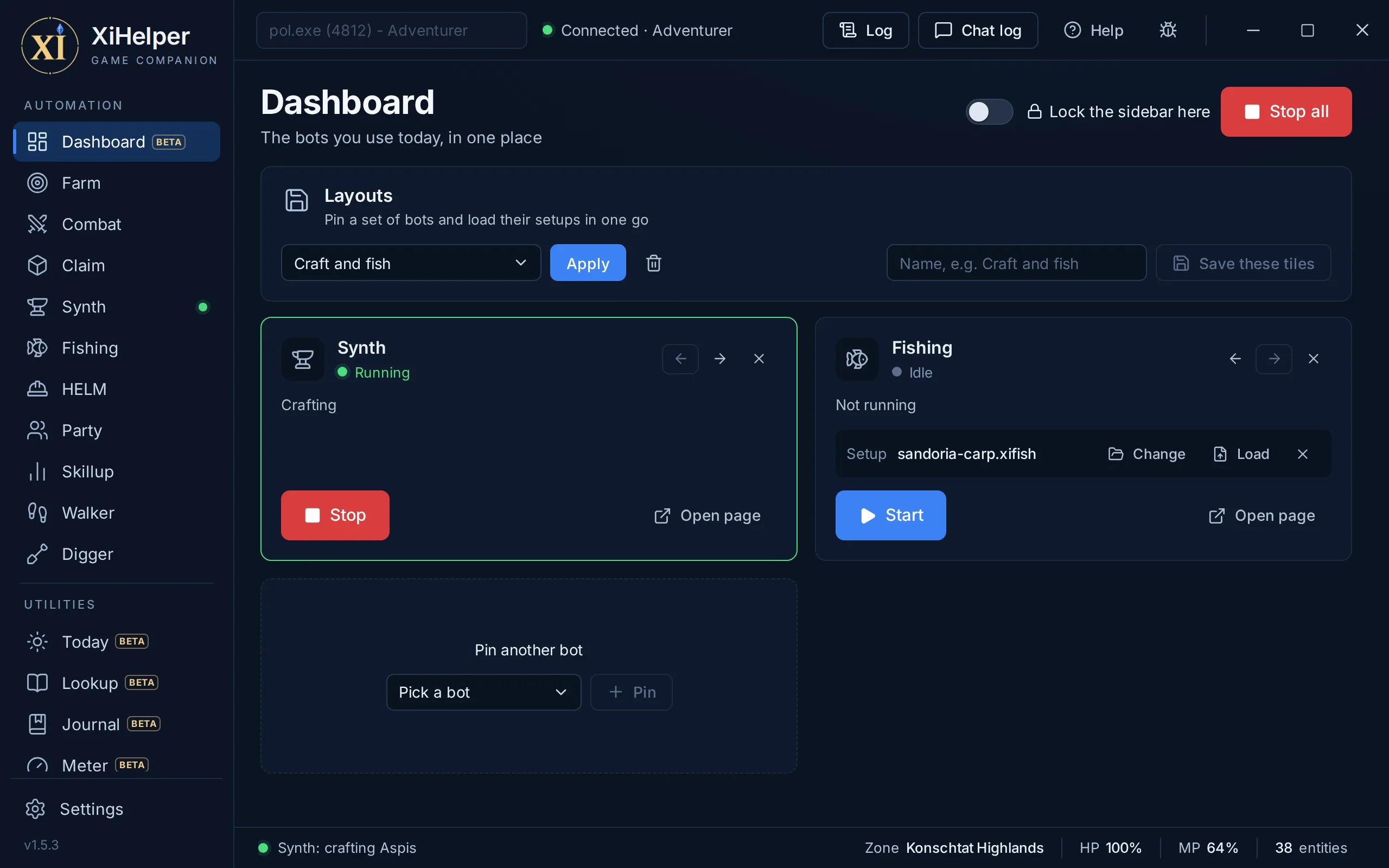
Pin the bots you use and each gets a tile with its Start and Stop, what it is doing, and its page a click away. Save the tiles as a layout to set them all up again in one click.
The Dashboard tab in XiHelper
Pinned botsEach tile has its bot's Start and Stop, what it is doing now, and Open page for its settings. Order the tiles with the arrows.
A setup on each tileA tile can hold a setup file saved from its page, and Load puts it into the page, never while that bot runs.
LayoutsSave the tiles under a name, Craft and fish say, and Apply pins its bots and loads each one's setup in one go.
Lock the sidebarWhile it is on, a click that lands on the sidebar as you switch back to the window opens nothing.
Stop allOne button stops every bot that runs.
Automation

Farm

Hunts your route while you're away

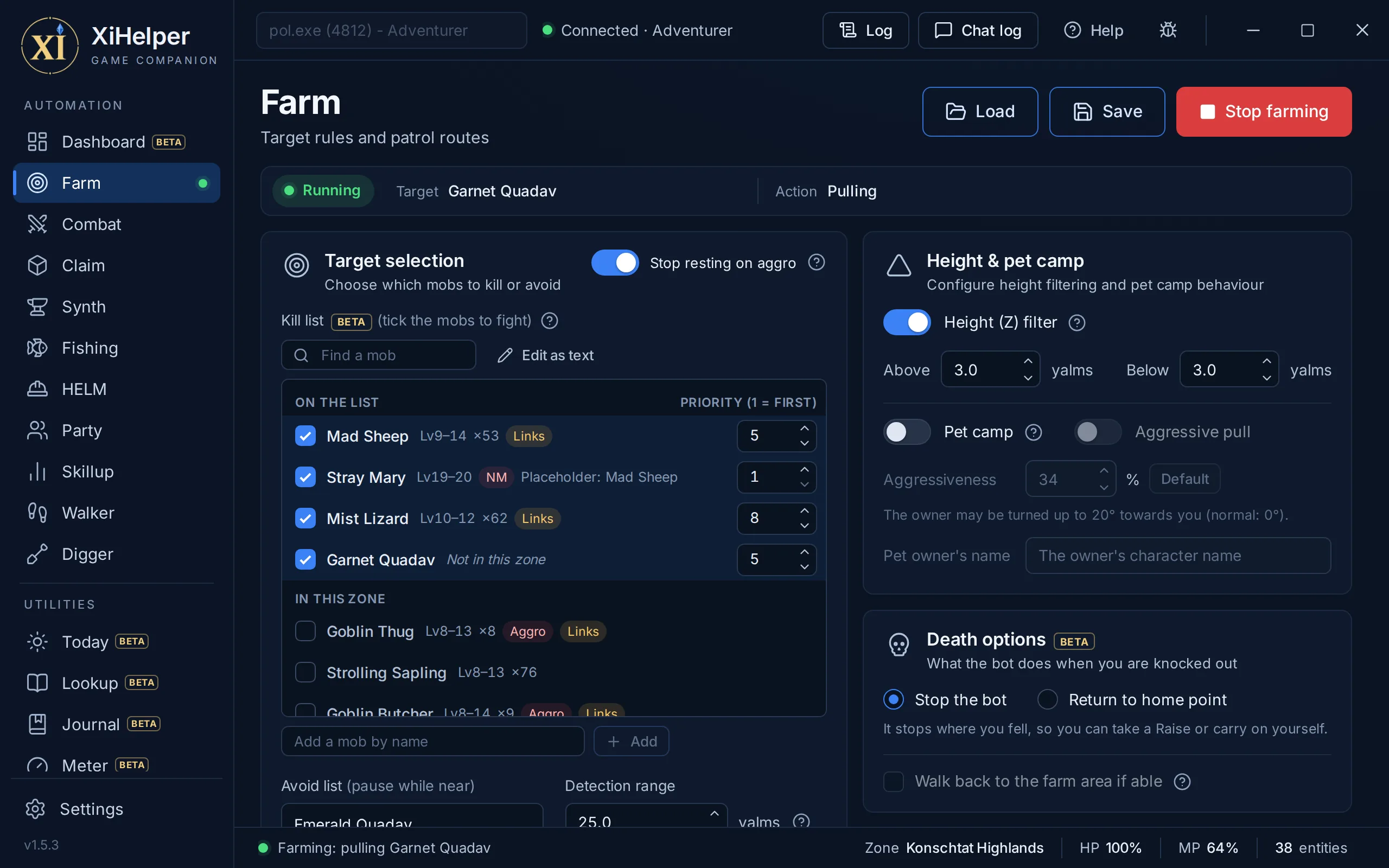
Farm walks a patrol route you record, finds the mobs on your kill list and pulls them one at a time. Start Combat as well and Combat does the fighting, resting and healing. On its own, Farm moves and targets but does not attack.
The Farm tab in XiHelper
Kill, avoid and height filtersList the mobs to hunt and the ones to stay clear of: while anything on your avoid list is in range, scanning pauses. The height filter only takes mobs within a band above and below you, for camps stacked on ledges.
Nearest valid target firstIt takes the closest kill-list mob that passes every check: alive, not claimed by another player (your party's claims are fair game), not someone's pet, and inside your detection range and wander leash. Every spawn is tracked on its own, so two mobs with the same name are never mixed up.
Aggressive mobs firstWhile an aggressive mob from your kill list is within the range you set (15 yalms to start), it is fought before any passive one, so it cannot join in halfway through another fight. Mobs too weak to aggro you at your level are ignored, and aggro data comes from the server data level-75 servers run on, so keep an eye on a new camp.
Stop resting on aggroStand up from a rest the moment a mob turns on you, before its first hit. Either way, a mob that actually hits you mid-rest ends the rest and is fought.
Pet campCamp a pet-pull spot by naming the owner: the pull fires about a second after the pet stops, once its owner is standing still and not facing you, and the pet's path in stays out of the owner's sight. The status bar says why it is holding.
Aggressive pullAlso pull while the owner is turned partly towards you, as far as the percentage you set allows. 0% is the normal rule, and our tested setting (34%) is one click away with Default.
Per-mob rulesTarget a mob in-game and add a rule for that one spawn or for every mob of its name: ignore it, approach and engage, or engage without moving. A rule can also exempt the mob from the height filter.
Pull recoveryWhen a pull does not go off, it fixes the cause and pulls again: "Unable to see" turns you to face the mob, and a missing ranged weapon or ammo puts your Combat Ammo on first. A pull that never lands is retried too, and after 3 tries in a row the mob is set aside for 15 seconds.
Patrol routes you recordAdd a waypoint where you stand, or record the route as you walk at an interval you set. Walk it to the end and back, or loop it with Circular route; routes are kept per zone.
Choke points and waypoint rangesMark a waypoint as a choke point so the bot lands on it precisely and never pulls from there. Any waypoint can have its own wander and detection range.
Camp spotA route of a single waypoint is a camp: the bot walks onto the spot, pulls from there, and walks back to it after each fight.
Finds its own wayIt paths around walls and through doorways on a navigation mesh in 211 zones, and works itself free if it snags on the scenery. After each kill it watches for a few seconds for a linked mob before it moves on.
Save a whole campSave the Farm page, waypoints included, to a .xifarm file and load it on any install.
Live status stripA slim strip under the page title shows whether Farm is running, its target and what it is doing right now.
The zone's mobs, listedThe kill list shows the mobs of the zone you are in, with their levels and the zone's NMs. Tick the ones to fight, or add any other by name.
Kill priorityGive each mob on the kill list a priority from 1 (fought first) to 10, and the lowest number in range is fought first. For a placeholder camp, put the NM on 1.
Death optionsWhen you are knocked out: stop where you fell, or return to your home point as the death menu's button does and, with Walk back ticked, walk back to the start of the route and farm on.
Sees what is attacking youIt reads the game's own combat data, so a caster or archer hitting you from range, or an attack your shadows took, counts. A mob on the floor above or below is left alone.
Automation

Combat

Your fighting routine, built your way

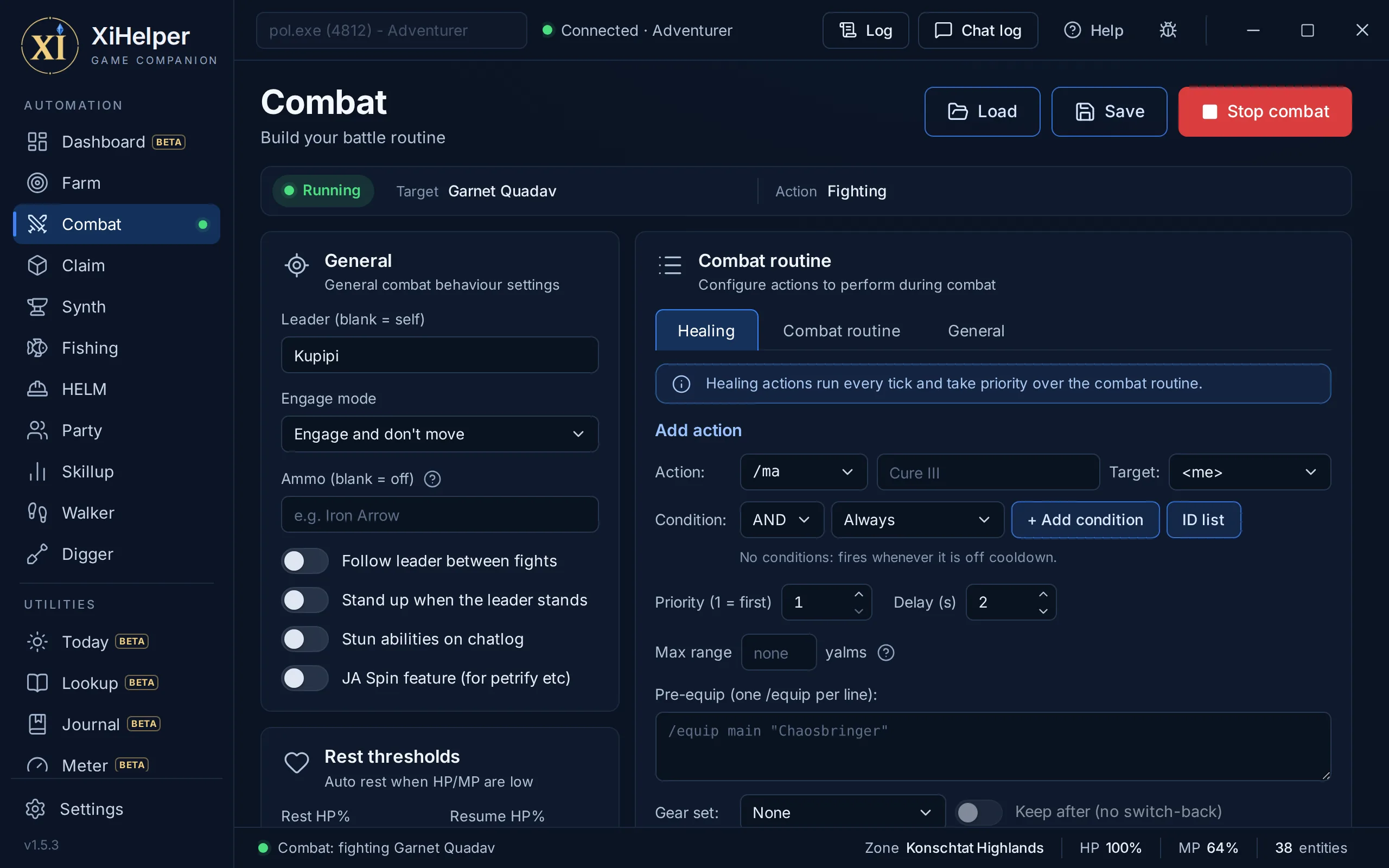
Combat is the fighting brain. You build a routine of spells, abilities and weapon skills with the conditions you choose, and it fights your own target or assists a leader's. Farm fights with the same routine, rest thresholds and ammo.
The Combat tab in XiHelper
Five action listsHealing runs every tick ahead of everything else, and General runs in and out of combat for the buffs you keep up. The routine's Pre-Engage, In Combat and Post-Kill lists fire at the start, during and at the end of each fight.
Any command, any targetEach action is a command (/ma, /ja, /ws, /ra, /attack, /pet, /item or one you type) aimed at <me>, <t>, <bt> or a party slot from <p0> to <p5>.
Conditions with AND and ORFire an action on your HP, MP or TP, your leader's HP, MP or TP, the mob's HP or your pet's HP, with clauses chained by AND and OR. In Combat and General actions can also wait for a line of chat text.
Buff and debuff checksFire only when you have, or are missing, any of 624 status effects. Pick them by name from a searchable ID list instead of remembering numbers.
Priority, cooldown and max usesWhen several actions are ready at once, the lowest priority number fires first. Each action has its own delay between uses, and In Combat actions can be capped per fight.
Range limits in yalmsAn action only fires while its target is within the max range you set. On the pull action it also sets how far the bot walks in before it shoots.
Waits out casts and recastsIt waits for a spell or ranged attack to finish before the next action, and holds job abilities until they are off recast.
Gear swaps per actionPut /equip lines before an action, or swap to a saved gear set for it and back again afterwards. Turn on Keep after to stay in the set.
Assist a leaderName a leader to fight their target, follow them between fights and stand when they stand. Leave it blank to fight your own target, and choose whether to hold position or move to the mob.
Rest thresholdsSit when your HP% or MP% drops below what you set, once nothing is hitting you, and stand when both are back to your resume values. A mob that attacks mid-rest stands you up.
Ammo re-equipIf a ranged attack fails for lack of ammo, it equips the ammo you name. If that fails twice running you are out: the Log says so and it waits a minute before trying again.
Stun on chatWhen a mob's chat line names an ability on your watch list, it fires your stun action to interrupt it. Load the watch list from a .txt file, one name per line.
JA Spin for gazesWhen a mob readies a move on your spin list, such as a petrifying gaze or Mortal Ray, it turns about 180 degrees away and back.
One file per jobSave the whole Combat page to a .xicombat file and load it when you change job. Edit any action in place, add a copy, or reorder the list, since each list runs top to bottom.
Aggro lostA condition for actions to use when the mob you are fighting turns away from you, such as Flash or Provoke.
Pet and Dancer conditionsNo pet out, Pet TP and Pet MP, Mob is on my pet, Finishing moves, Step level, Buff count, My TP and Mob is on me, for pet jobs, Dancers and shadows.
Dynamis procsIn Dynamis, Dynamis proc is says what can stagger your target now: a job ability, a spell or a weapon skill. Outside Dynamis it always passes.
Behind the mobBehind the mob and Party member between, for Sneak Attack, Trick Attack and the weapon skill after them.
Resting gear setA gear set to wear while you rest, taken off again when you stand. On Party and Skillup too.
Perform action on restAn item, spell or ability used once as each rest begins, before it sits: Yagudo Drink, say, or Refresh.
Automation

Claim

Your NMs, their windows, and the bot that claims them

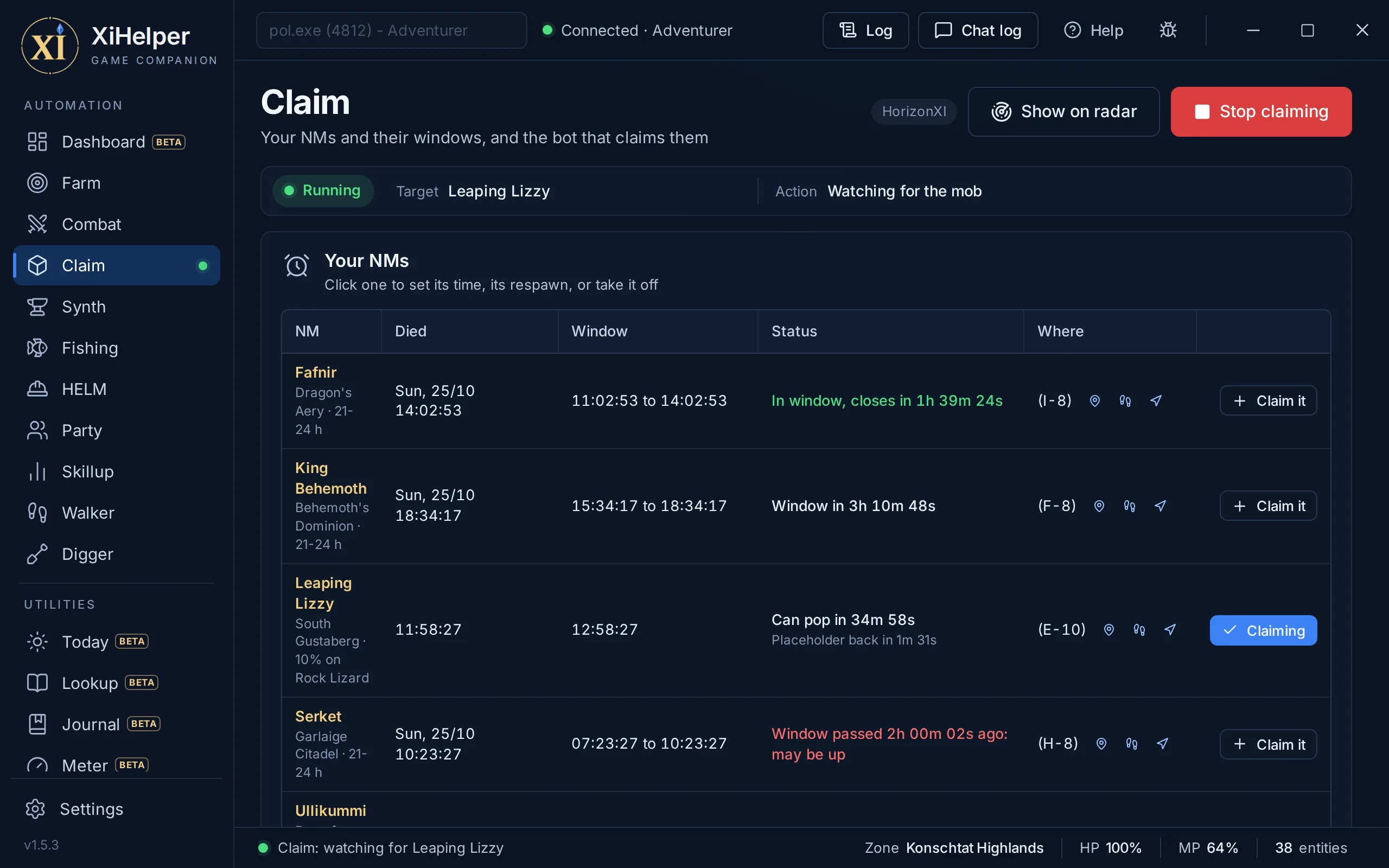
Your NMs sit at the top of the page with their windows, counting down, and Claim it puts one on the bot's list. The bot watches for the names on its list, closes on the nearest and fires your claim ability or spell the moment it is in range. Pick an After claiming, or start Combat as well, to fight what you claim.
The Claim tab in XiHelper
Times of death, caughtAttached, an NM's time of death is taken to the second when it dies near you. Or type it, or paste your linkshell's list: nicknames like KB and Jormy work.
Windows at a glanceEach NM shows its window and how long until it opens or closes, or that it has passed and may be up. A lottery NM shows when it can pop again, and its chance.
WarningsPick how many minutes before a window to be warned: a band across the app, a Log line and a soft chime you can turn off. It also says when one of your NMs pops, and counts a placeholder seen dying down to its return.
Your server's respawnsThe land kings start at 21 to 24 hours, and any NM's respawn can be changed to match your server. Its pop items show with how many you hold.
Claim itEach NM on the page has Claim it, to put it on the bot's list.
Your target listType the names to claim, one per line or comma separated. It picks the nearest living match and skips any far above or below you.
Unclaimed mobs onlyOn to start with: anything another player has already tagged is skipped, so you never poke someone else's target.
Any claim commandUse any command with <t> for the mob, such as /ja "Provoke" <t>, /ma "Dia" <t> or /ra <t>.
Claim rangeSet how close to be, in yalms, before it fires.
Walks in on the navmeshA mob beyond your teleport distance is walked to, pathing on the navigation mesh.
Teleport to claim rangeHigh risk: within the max teleport distance it warps to claim range, then fires, and teleporting is the clearest bot tell there is. Keep the distance low, or set it to 0 so it only ever walks; it also obeys the Warp page's exclusions and zone delay.
Live status stripThe strip under the page title shows whether Claim is running, its target and what it is doing.
Placeholders tooAlso claims the set placeholder spawns of the NMs on the list, in your zone, only while the NM itself is nowhere to be had, so killing them gives the NM its chance to pop.
Extended RangeWith it on, a target a Wide Scan finds past render range is headed for too: the bot walks towards it and claims it once it is in range.
Pre-claim actionSomething to use on yourself once as the bot sets off walking to a mob, such as Flee or Powder Boots. Never when the mob is already in range.
After claimingDo nothing, engage where you stand, or engage and walk in to melee range, and stay on the mob until it is down. A claim spell or ranged attack always goes off before the bot moves.
Show on radarOpens the radar in its own window with your NMs marked, and their set placeholder spawns, so you can watch the placeholder.
Automation

Synth

Crafts a recipe until you say stop

Synth repeats a crafting recipe for you: it sends each synth, reads the result, pulls short materials in from storage and keeps going until your count is reached or your materials run out. Stand at a guild and let it work.
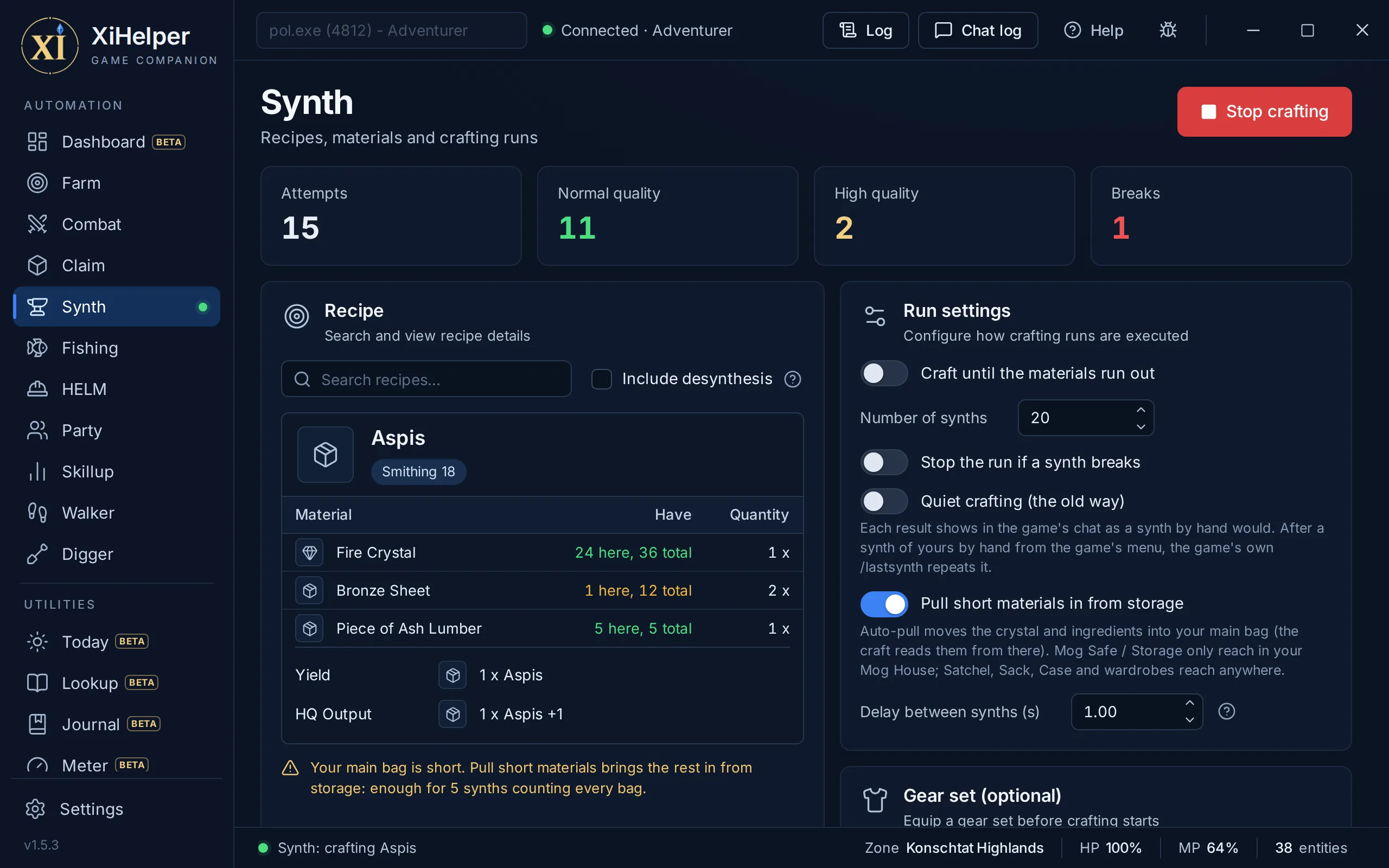
The Synth tab in XiHelper
3,907 recipes built inSearch by the item's name (two letters or more), with desynthesis recipes when you tick Include desynthesis. Recipes turned off in the server data are flagged.
The recipe at a glanceSee the crystal, every ingredient, the skill it needs, the yield and the HQ results.
What you have on handEach material shows how many you hold in your main bag and in total: green when your main bag covers a synth, amber when only your other bags do, red when you are short. A line says how many synths your bags allow.
Run lengthCraft until the materials run out, or set a number of synths.
Stop on a breakHalt the first time a synth breaks, so a bad batch does not burn all your stock.
Pulls materials from storageWhen your main bag is short it moves the crystal and ingredients in first: from the Satchel, Sack, Case and wardrobes anywhere, and from the Mog Safe and Storage while you are in your Mog House.
A human paceSet a delay between synths so the run is not paced like a machine.
Crafting gear setPick a saved gear set to wear once when the run starts, such as your skill-boosting crafting gear.
Live tallyCounters for attempts, normal quality, high quality and breaks update as it works.
Crafting logEvery synth is logged, with its high-quality tier, breaks and skill-ups, whether the bot made it or you did.
The game crafts each oneOnce your last synth by hand was this recipe, the bot crafts with the game's own /lastsynth, and the game says each result in your chat.
Quiet craftingThe old way, if you prefer it: the bot sends every synth itself and nothing shows in the game's chat.
Automation

Fishing

Casts, fights and lands on a human rhythm

Fishing casts, fights the bites you want and throws back the rest, on randomised timing. It reads every bite straight from the game rather than the chat log, plays the fishing fight with key presses, the way you would, and stops on its own when a limit is reached or something goes wrong.
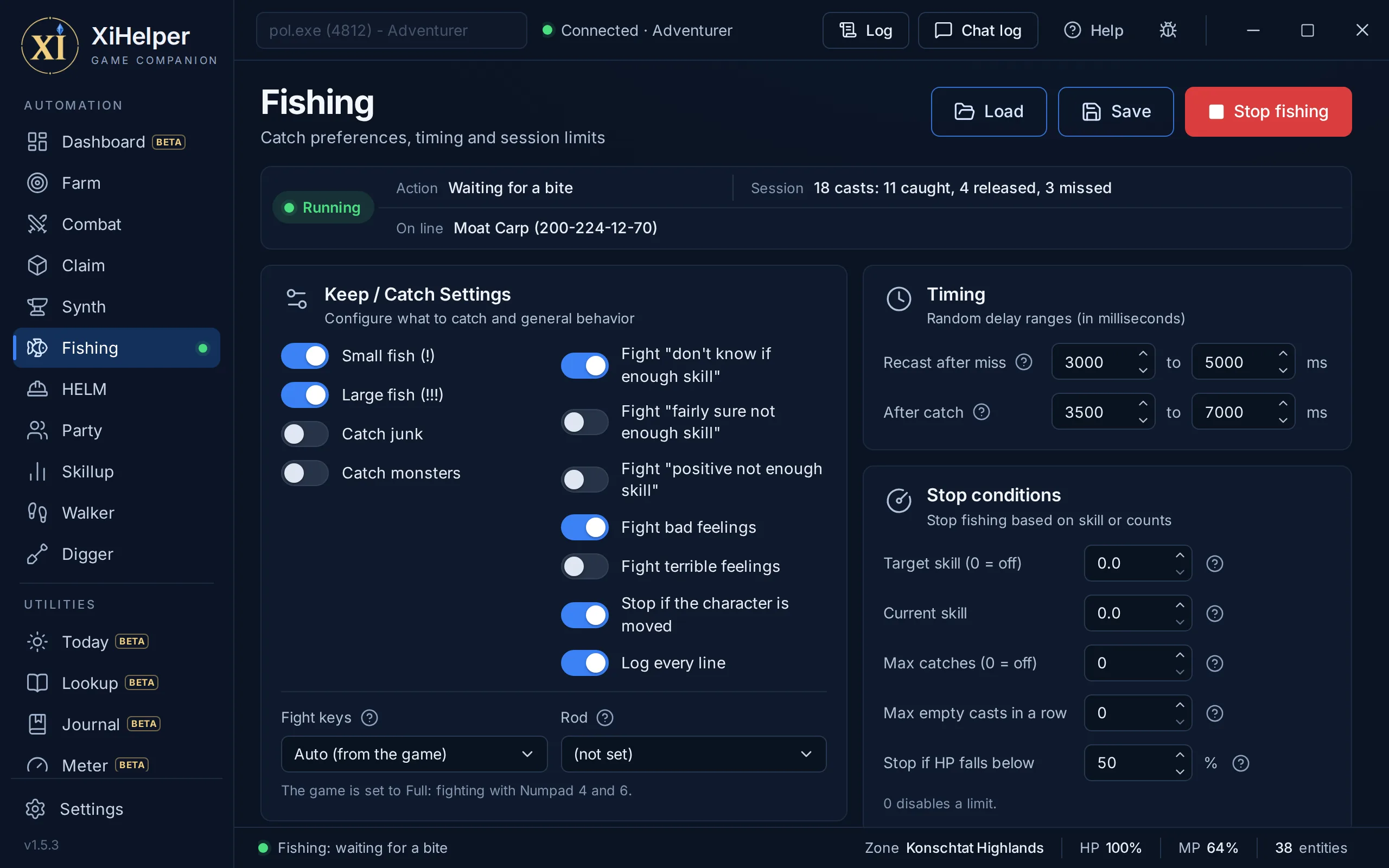
The Fishing tab in XiHelper
Reads the game, not the chatWhat took the hook, the feeling about it and how the cast ended come straight from the game's own fishing messages, through XiHelper's plugin. A busy or frozen chat log cannot hide a bite from it.
Learns each zone as it goesEvery zone numbers its fishing messages differently, so the first bite or empty cast in a new zone teaches it that zone's, helped by other anglers' catches nearby. It remembers them for next time.
Lets go in a secondA catch you do not want is thrown back within about a second of the bite, the way a player would. If the game is not ready for the first press, it presses again.
Plays the fight with keysWhen an arrow shows, it presses that direction after a quick, varied reaction, and presses Enter to land the fish once its stamina runs out. Nothing is written into the game.
Your keyboard layoutThe fight keys follow the game's Keyboard Size setting: Numpad 4 and 6 on Full, your Move Left and Move Right keys on Compact. On Auto it reads that setting and switches keys if the fish's stamina stops dropping, or pick A and D or Numpad 4 and 6 yourself.
Finds the fish itselfOn a game version it does not know yet, it searches the game's memory for the hooked fish on the first bite and reads it from there for the rest of the session. If it still cannot see the fish three times in a row, it stops and says why.
Choose what to keepToggle small fish (!), large fish (!!!), junk and monsters. A monster you release is remembered and thrown back on sight next time.
A switch for every warningChoose whether to keep fighting after a "bad feeling" or "terrible feeling", and after each of the game's three skill warnings: "don't know if", "fairly sure" and "positive" you lack the skill. Throwing them back saves time and can save your line and rod.
Keep and release listsName the fish to throw back, or keep only the ones you list. Match by name, by a catch's exact id from the On line readout, or by its first id; a line it cannot read is flagged in red.
Learns names as it goesEach catch arrives with its name, so it can land an unknown catch once to learn it. With your rod set, an unknown catch shows a shortlist of likely names.
Bait that swaps itselfList your baits and lures in order: when the hook is empty it equips the next one it finds, and stops once none are left. Keep them in your inventory or a wardrobe.
Separate random delaysRecasting after a miss and after a catch use separate random ranges, since one pattern for both is itself a tell. A catch thrown back recasts sooner.
Stop conditionsStop at a target skill, a number of catches, a run of empty casts, low HP, a full bag, a broken rod or if your character is moved. The skill counter is seeded by hand, since the bot cannot read your skill.
Vana'diel and Earth hoursFish only within the game hours, your local hours, or both. Outside the window it waits rather than stops.
Keeps Sneak upRecasts Sneak between casts when it is about to wear off, or runs your own command to use an item instead.
Tally and catch historyThe status strip shows what it is doing, what is on the line and the session tally, with your top catches on hover. Every cast and what came of it is written to fish_history.csv.
Clear stops and saved setupsWhen it stops on its own, a red banner on the page says why. Save every Fishing setting to a .xifish file.
Fishing logYour casts and catches by zone and bait, with catches an hour and what was landed. When the character is moved and the bot stops, the Log says where you stood and faced before and after.
Hooked fishEvery catch that took the hook, kept, thrown back or lost, named once one is landed, with Release it to put it on the Release list.
Every bait to pick fromPick your bait from every bait and lure in the game, the ones that bite in your zone first, with how many you carry. The Keep and Release lists show what bites here.
Automation

HELM

Walks your route and gathers every point

HELM (Harvesting, Excavation, Logging and Mining) walks a patrol route and works any gathering point it finds in range. It stops on its own when you are too tired to gather, your bag is full or your tools run out.
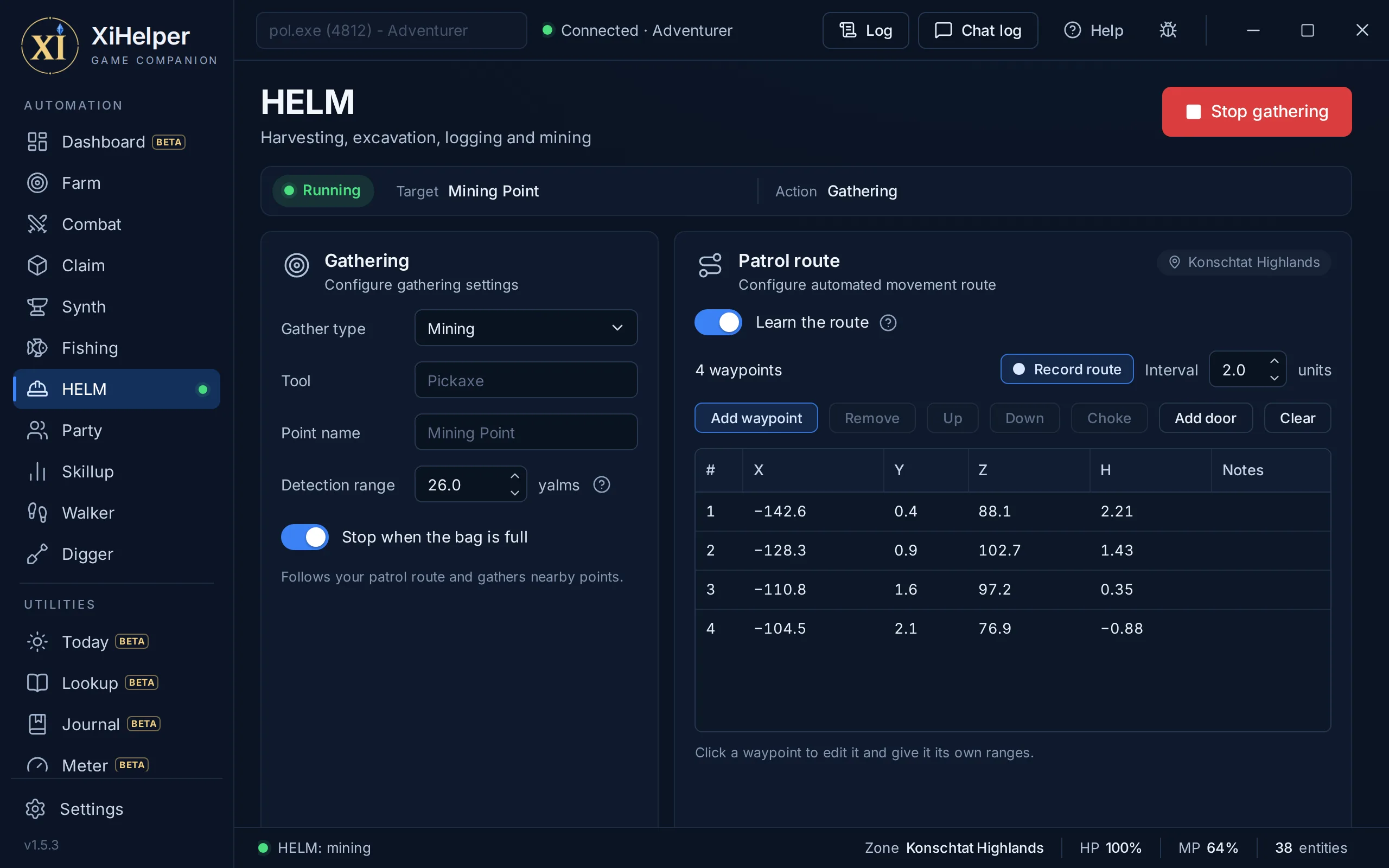
The HELM tab in XiHelper
Four gathering typesPick Mining, Excavation, Logging or Harvesting, and the usual tool and point name fill in for you.
Your own tool and pointLeave the boxes blank for the defaults, or type another tool or gathering point name.
Detection rangeSet how far, in yalms, to look for a gathering point worth walking to.
Patrol route editorThe same waypoint editor as Farm: record as you walk, reorder, mark choke points and give a waypoint its own ranges. HELM walks its route to the end and back, and keeps one route per zone.
Navmesh walkingIt walks between waypoints and out to each point on the navigation mesh.
Route filesSave and load routes as .xiroute files, or load the waypoints from a Farm setup.
Stops on its ownIt stops on gathering fatigue and a full bag. With your inventory read through the plugin, it also stops when the last tool is used up.
Live status stripThe strip under the page title shows whether HELM is running, its target and what it is doing.
Automation

Party

A dependable party member in your role

Party Helper plays a support role in a real party. It assists on the mobs from your list that are attacking your party, follows a member, provokes, opens with Sneak Attack and Trick Attack, skillchains with a partner and cures.
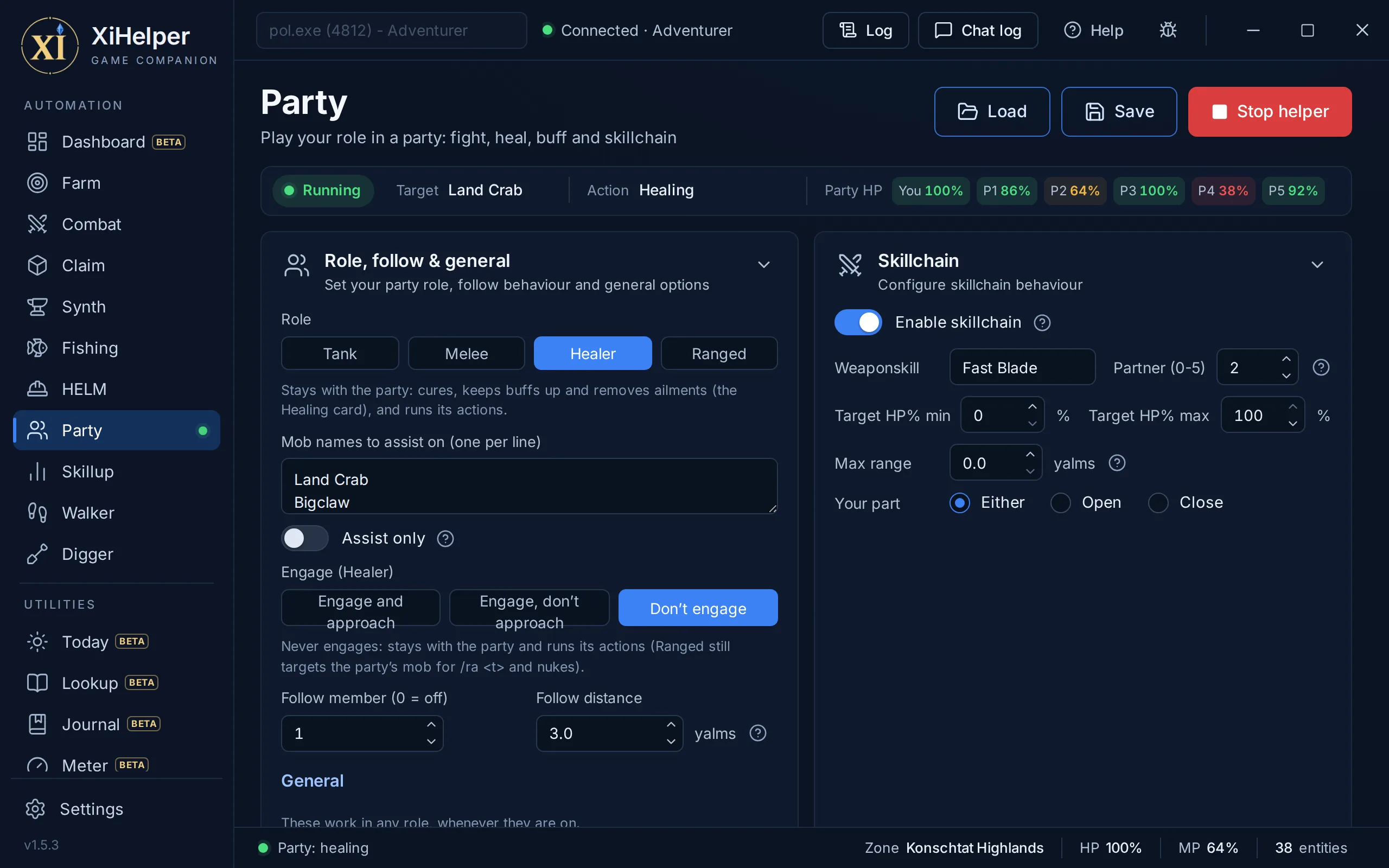
The Party tab in XiHelper
Tank, Melee or RangedPick the role you play in the party. Provoke only acts in the Tank role, and the page says so if it is on in another.
Assists your partyList the mobs to fight, and it takes on the one attacking a member of your party.
Follows a memberFollow a party slot between fights, moving in whenever they are further away than the distance you set.
Provoke as tankProvoke the party's mob from where you stand each time Provoke is ready, or walk in first and then Provoke.
SATA openerAs a Thief (main or support job) it gets behind each new mob, lines up behind your SATA partner and uses Sneak Attack then Trick Attack, so the hate goes to them. If the partner is not behind the mob within 15 seconds, it opens with a plain attack.
Skillchain with a partnerSet a weapon skill, a partner's party slot and a target HP% window, then choose your part: Open, Close or Either.
Open and close timingOpen weapon skills once your partner also has 1000 TP, and Close waits for their weapon skill, then closes about 1.5 seconds later. Two XiHelper players can chain together, one on each part.
Tiered auto-cureCure to Cure V, each tier with its own HP% window, using only tiers you know. It casts at most one cure every 2 seconds and waits out each spell's recast.
Party HP at a glanceThe status strip shows the target, the action and each member's HP, coloured as it drops.
Provoke, two more waysThe tank can Provoke each new mob first (the opener), and whenever the mob turns away to attack someone else. Provoke goes once the mob is in range and times its recast from the game's own message.
Curing WaltzAs a Dancer, main or support job, the healer can use Curing Waltz on party members, by your TP and their HP.
Engage once it is closeEngage once the mob is within: it engages only once the mob is that close, whether it walks in or not.
Weapon skill reachMax range on the Skillchain card: when it is time to weapon skill and the target is out of reach, it walks in first.
Stun and JA SpinThe Combat page's stun on a mob's chat line and its spin away from gazes work here too, in any role.
Automation

Skillup

Magic skill-ups while you step away

Skillup casts a spell rotation for magic skill-ups, rests to get MP back and repeats. Pick a job preset to start, then tune it to suit.
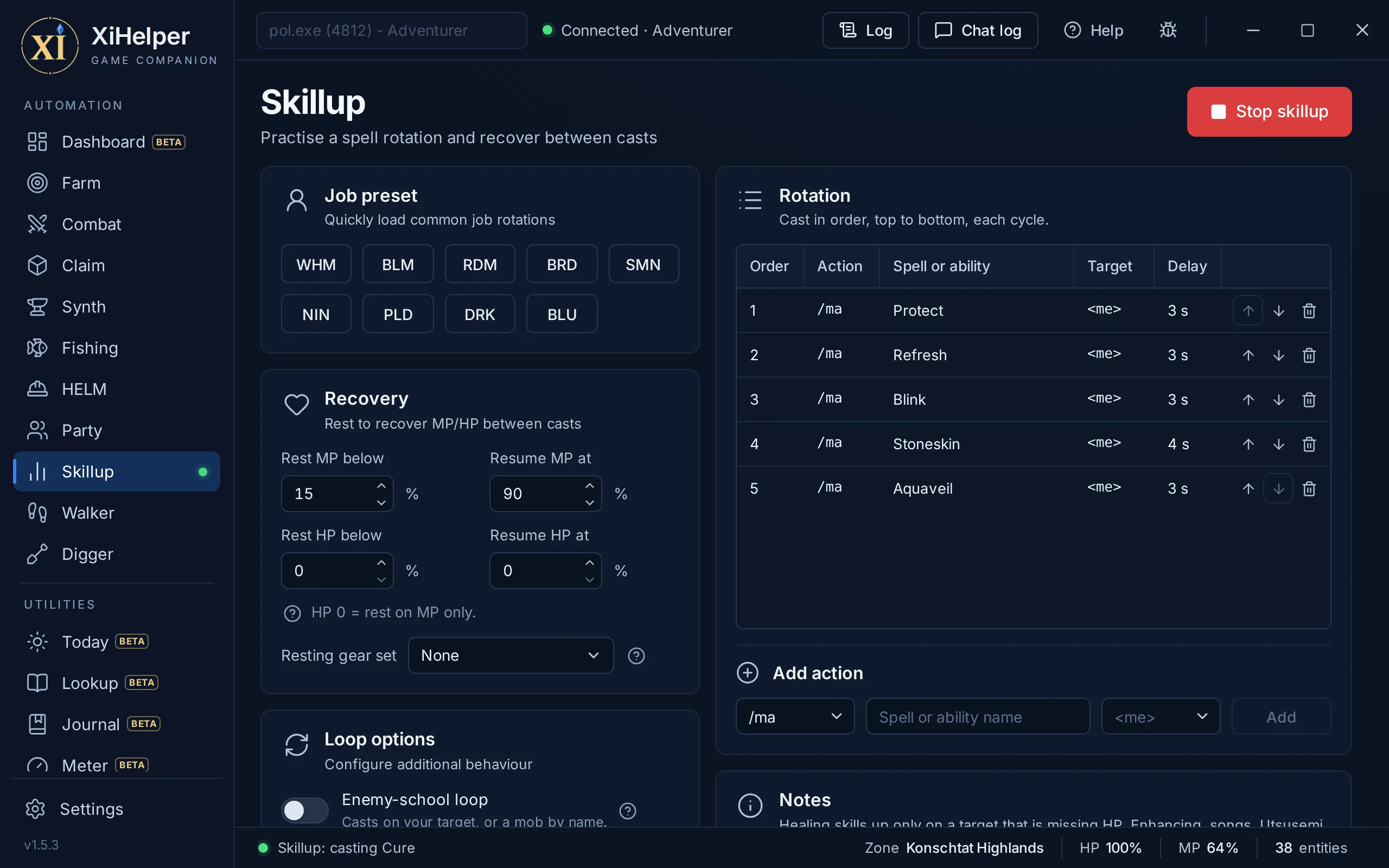
The Skillup tab in XiHelper
One-click job presetsWHM, BLM, RDM, BRD, SMN, NIN, PLD, DRK and BLU each fill a sensible rotation and rest thresholds. Hover a button to see what it loads.
Your own rotationAdd any spell, ability, pet command or item, aimed at yourself, your target, your battle target or a party slot, each with its own delay. Move rows up or down, or remove them.
Rests and resumesRest when MP or HP drops below your numbers and resume once both are back. Set HP to 0 to rest on MP only.
Enemy-school loopFor Elemental, Enfeebling, Dark and Divine magic it keeps one mob targeted, yours or the nearest by name. It casts only while that mob is alive, within 20 yalms and not someone else's claim.
SMN Blood Pact loopSummon an avatar, use a Blood Pact on its recast, then release it before resting so it stops draining your MP.
Notes on each skillA reminder on the page of which skills need an enemy, which need none, and that Ninjutsu uses a ninja tool per cast.
Automation

Walker

Click the map, it walks you there

Walker walks you to any spot you click on a zone's map, through every zone in between, out of sight and earshot of the mobs that would aggro you, keeping Sneak and Invisible up on the way.
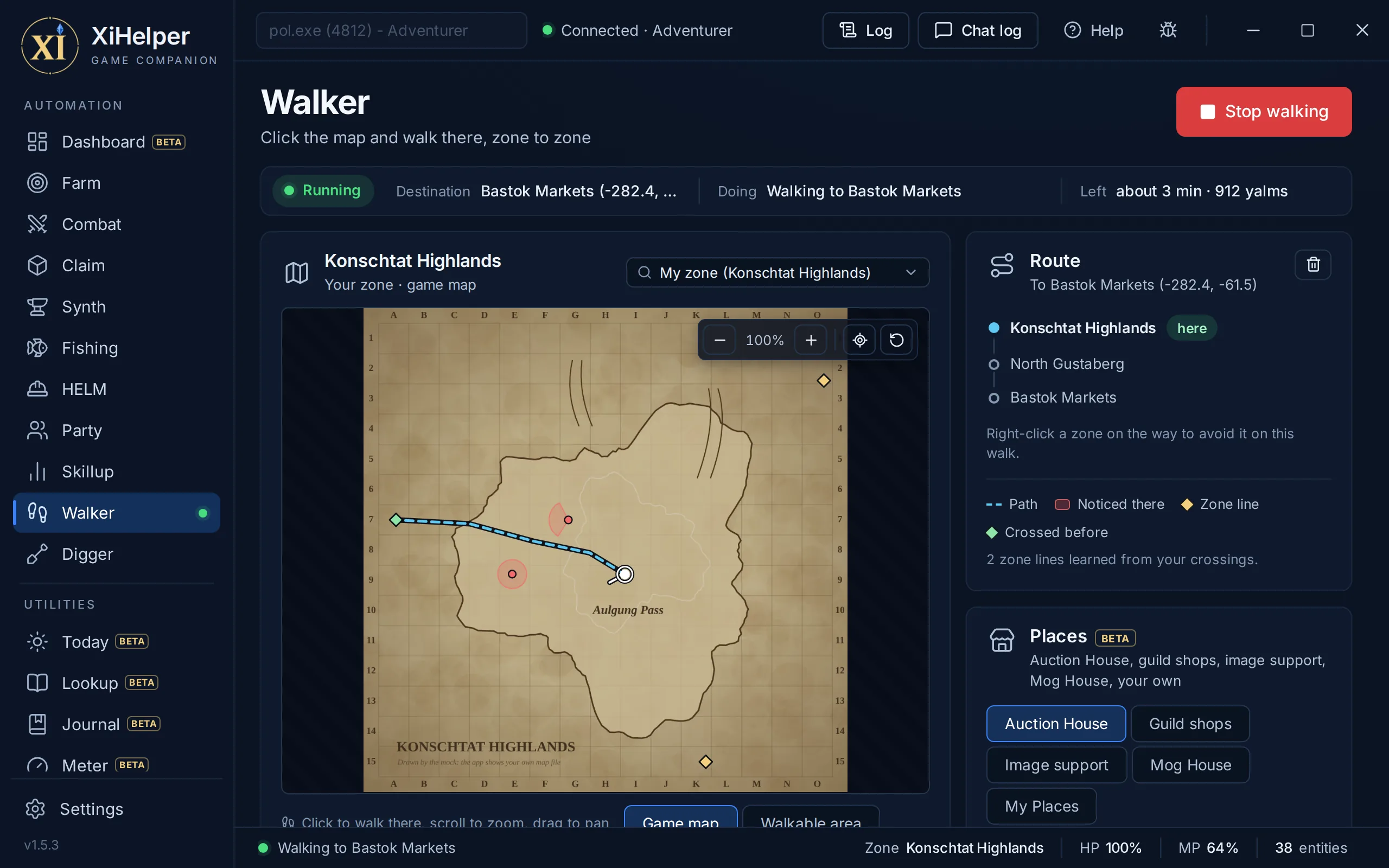
The Walker tab in XiHelper
Click to walkClick anywhere in your zone and it walks there on the navmesh, following the path tightly round corners and through doorways.
Any zone, zone to zoneType a zone's name in the zone list, pick it and click a spot on its map. It works out which zones to go through and which zone line to take out of each, then walks the whole way.
Zone lines from the server's own filesWhere each zone line is and where it lands you come from the LandSandBoat server's zone files. Each line it crosses is remembered where it really is, so the next trip uses the real spot.
Out of sightIt paths round the cone in front of an aggressive mob that aggroes by sight, at the Sight range you set.
Out of earshotIt keeps the Hearing range you set (15 yalms to start) from an aggressive mob that aggroes by sound, or by smelling blood when your HP is low.
Waits for mobs to settleA mob on the move can turn at any moment, so near the way ahead it waits while any one is moving, watches until they have all stopped, then plans past behind them and goes. A mob that has not moved at all is trusted after a few seconds, and it never waits more than 30 seconds.
Too weak to botherA mob that checks too weak for your level will not aggro, so it is walked past like a passive one. With Invisible on, mobs that see are ignored; with Sneak on, mobs that hear are, except those with true sight or hearing.
Sneak and Invisible kept upTurn on Keep Sneak on and Keep Invisible on and each goes back on as soon as it wears off. It stops to cast only where nothing close would notice, and not in towns, where nothing aggroes, unless you tick Use in town.
Your way of putting them onSpectral Jig on a Dancer, the spells when you know them and have the MP, or Silent Oil and Prism Powder from your bags. Leave it on Best to hand or pick one.
If something aggroes anywayKeep walking, since a zone line sheds most mobs, or stop and leave the fight to you.
Game map or walkable areaWalk on the game's own map, or switch to the navmesh drawn as a map: exactly the ground the Walker can walk. The path ahead, the zone lines and where each mob would notice you are drawn on it.
Anti-Ban knows it is walkingThe zone lines the Walker takes do not trip Anti-Ban's zone-change stop. A zone change anywhere else still does.
Places to walk toWalk to any town's Auction House, a crafting guild's shop (with its hours) or Advanced Synthesis Image Support, and stop on the ground beside the counter.
On a chocoboIt keeps to zones a chocobo may go into when that is not much further, rides straight past mobs (nothing aggroes a rider) and gets off at a town's zone line.
Tonko for NinjasA Ninja keeps Invisible up with Tonko: Ni or Tonko: Ichi, ahead of every other way.
My PlacesStand somewhere, name it and save it, then walk back to that very spot from anywhere in one click. The same for every character.
Mog House doorsMog House doors are on the map and the Places card, and a walk started in your Mog House goes out of the door first.
Automation

Digger

Chocobo digging on a random path

Digger digs with your chocobo through the zones you pick, on a new random path through each one every lap, at the pace the server allows. It walks with the Walker, kept to the digging zones, and stops on its own when the greens, the bag or the day's finds run out.
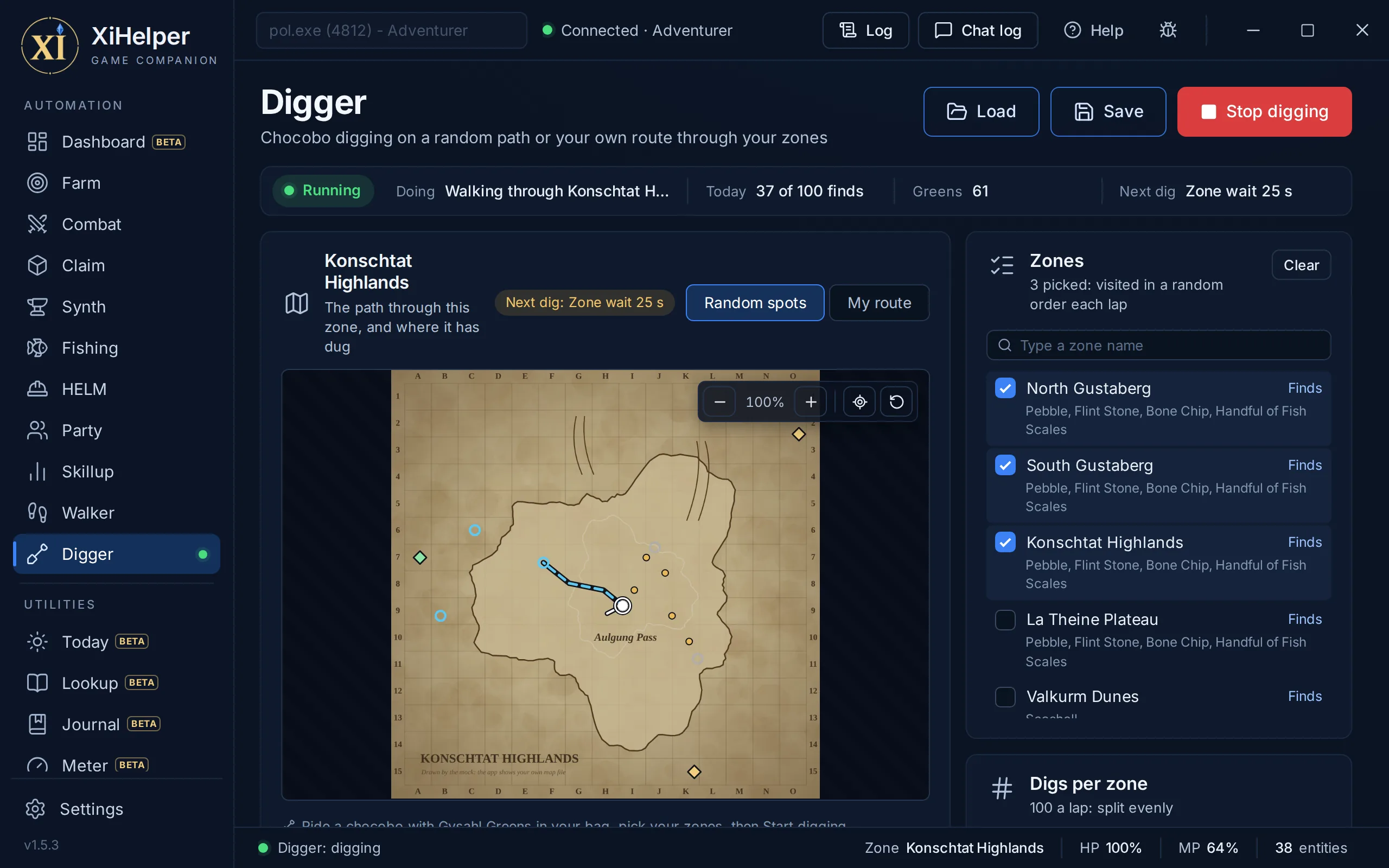
The Digger tab in XiHelper
Pick your zonesTick any of the 26 zones the server lets you dig in. Each one lists what a chocobo can turn up there, how common it is, and the digging rank it needs.
Never the same path twiceEach lap shuffles your zones and draws a fresh random path through each: spots spread over the whole zone, kept apart and clear of its zone lines, walked in a wandering order.
Digs per zoneYour finds for the day start split evenly over your zones. Change any zone's number and the rest keep theirs; Split evenly puts them back. It stays in a zone until its digs are done, drawing another path if one runs out first.
The server's own paceSet your digging rank and it keeps to the server's timing: how often you may dig, how long after zoning in, and never twice in the same spot, where a dig finds nothing and still eats a Gysahl Green.
Counts the day's findsThe server allows 100 finds a Japanese day. It keeps count across restarts, resets at midnight in Japan, and stops at the limit you set.
Never into a townIt walks with the Walker, kept to digging zones, so its route never passes through a town a chocobo cannot enter.
Stops when it shouldOut of Gysahl Greens, a full bag, the day's finds used up, the laps done, or no longer riding a chocobo: it stops and says why.
Watch it digThe map shows the path through the zone you are in, the spots still to come and every dig so far, beside a tally of what it has turned up.
Anti-Ban knows it is diggingThe zone lines it crosses between your zones, and the HP reading as it loads in, do not trip Anti-Ban. A zone change anywhere else still does.
Your own routePick My route and click your points in a zone, or press Record and ride the loop once: it rides round them lap after lap, digging as it goes. Each zone keeps its own route.
Save the whole pageSave and load your zones, options and every zone's route as a .xidigger file. The Dashboard loads one too.
Utility

Today

What is worth knowing now

Today gathers the rest of the app on one page: NM windows about to open, the next step of each mission and quest you track, your bags, gear upgrades you own and your gil an hour. Its farm coach adds up what each spot you farm earns.
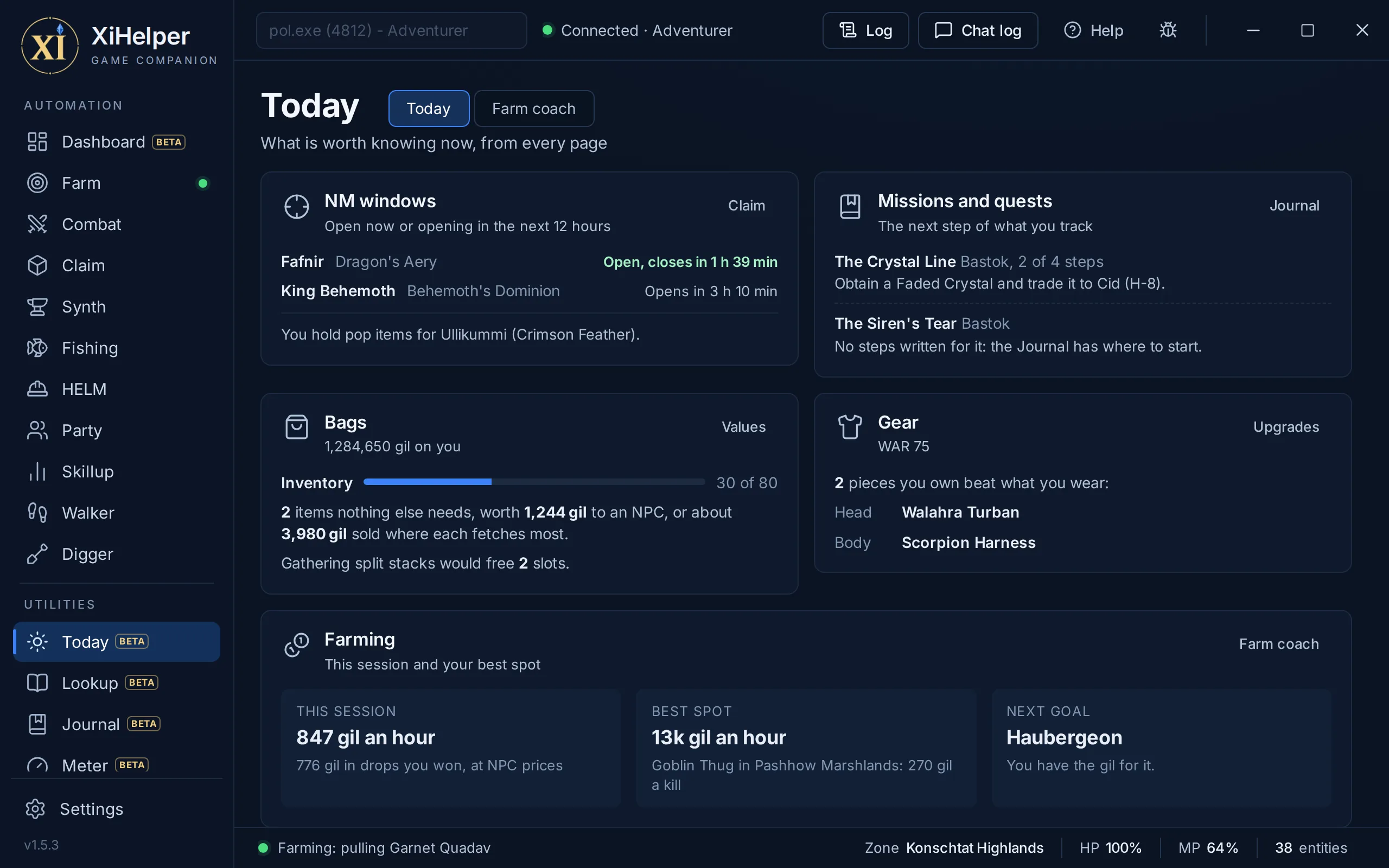
The Today tab in XiHelper
NM windows, coming upThe Claim page's NMs whose window is open or opens in the next 12 hours, and the NMs you hold a pop item for.
Next stepsThe next step of each mission and quest you track in the Journal.
Bags and gear at a glanceHow full your Inventory is, what you carry that nothing else needs and what an NPC pays for it, and the pieces you own that beat what you wear.
Farm coachEvery monster you or your party kill is counted by zone, with the gil it gives and what its drops fetch from an NPC, so each spot shows its gil a kill and gil an hour, the best first.
GoalsAdd something you are saving for, with its price (35k and 1.2m both work). The coach says how much gil it still needs, counting what you carry, and how long your best spot takes to earn it.
Utility

Lookup

The game's wiki, built in

Every item, monster, NPC, recipe and battlefield, with where to find them. It works with the game closed; attached, it adds your map squares, how far a place is from you and how many of an item your bags hold.
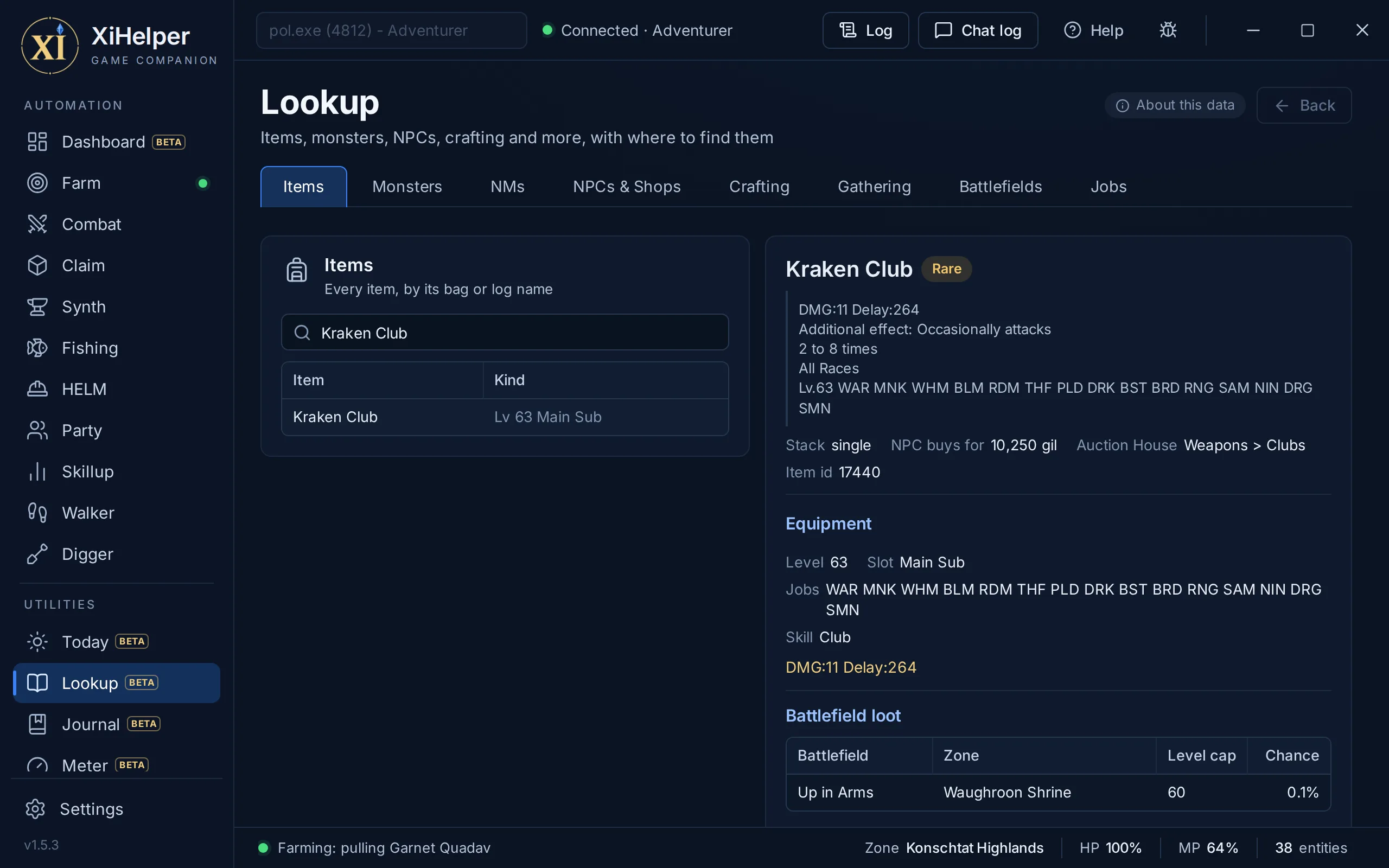
The Lookup tab in XiHelper
Items in fullStats in the game's own wording, who drops it (and who can be robbed of it), who sells it, guild shops with their hours, where it is gathered, the recipes that make or use it, battlefield loot, quests and the NM it pops.
Monsters near your levelCamps by zone and level, with aggressive monsters, linkers and those only out at night or in their weather marked. Near my level picks the ones worth experience.
NMs and their popsSearch by the NM, its placeholder or its pop item, for the placeholder's chance, the respawn, the pop items (and whether you have them) and the drops.
Crafting, gathering, battlefields and jobsRecipes with what you are short of, what each zone's gathering points and chocobo digs give, battlefields with their caps and loot, and every job's abilities, traits and spells by level.
Show on map, walk thereEvery place has its map square, as the game numbers them, and two buttons: one marks it on the Walker's map and the other sets the Walker off, through as many zones as it takes.
Clear about its sourceThe data is LandSandBoat's base game for the 75 cap era, which HorizonXI, Eden and Phoenix build on. A server can change a drop rate, a shop or a camp, and the page credits where its data comes from.
Utility

Journal

Missions and quests, step by step

Every storyline's missions and the quests, step by step, with who to talk to and where. Attached, it knows where you are in each from your logs and ticks steps off as you play.
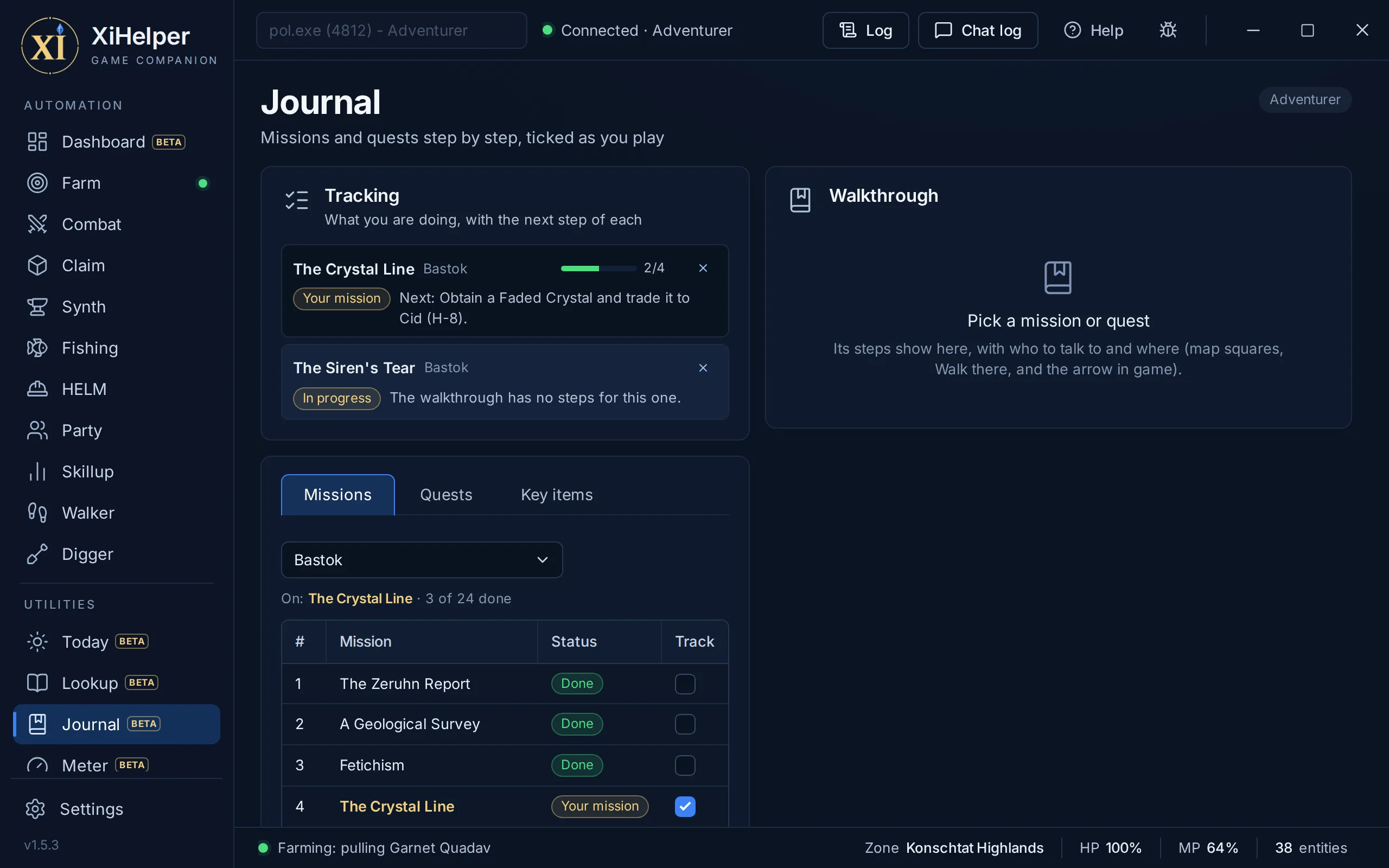
The Journal tab in XiHelper
WalkthroughsEach step names the person, their zone and map square, and the key items it needs, ticked when you have them.
Ticks itselfEntering a step's zone, getting its key item, talking to its NPC or defeating its monster ticks it off, with the steps before it.
Point me thereAn arrow in the game says which way to turn and how far, as you go. Or send the Walker there.
TrackingTrack a mission or quest and its next step shows on the page and on Today. A mission you take in the game can track itself, and a finished one makes way for the next of its storyline.
Key items across charactersKey items lists yours, with which of your other characters have each.
Utility

Meter

Damage and threat, live

The Meter counts your party's and alliance's damage as it happens, with accuracy, critical hits, weapon skills and magic bursts, and estimates who has the mob's attention. On its page, or in a small window beside the game.
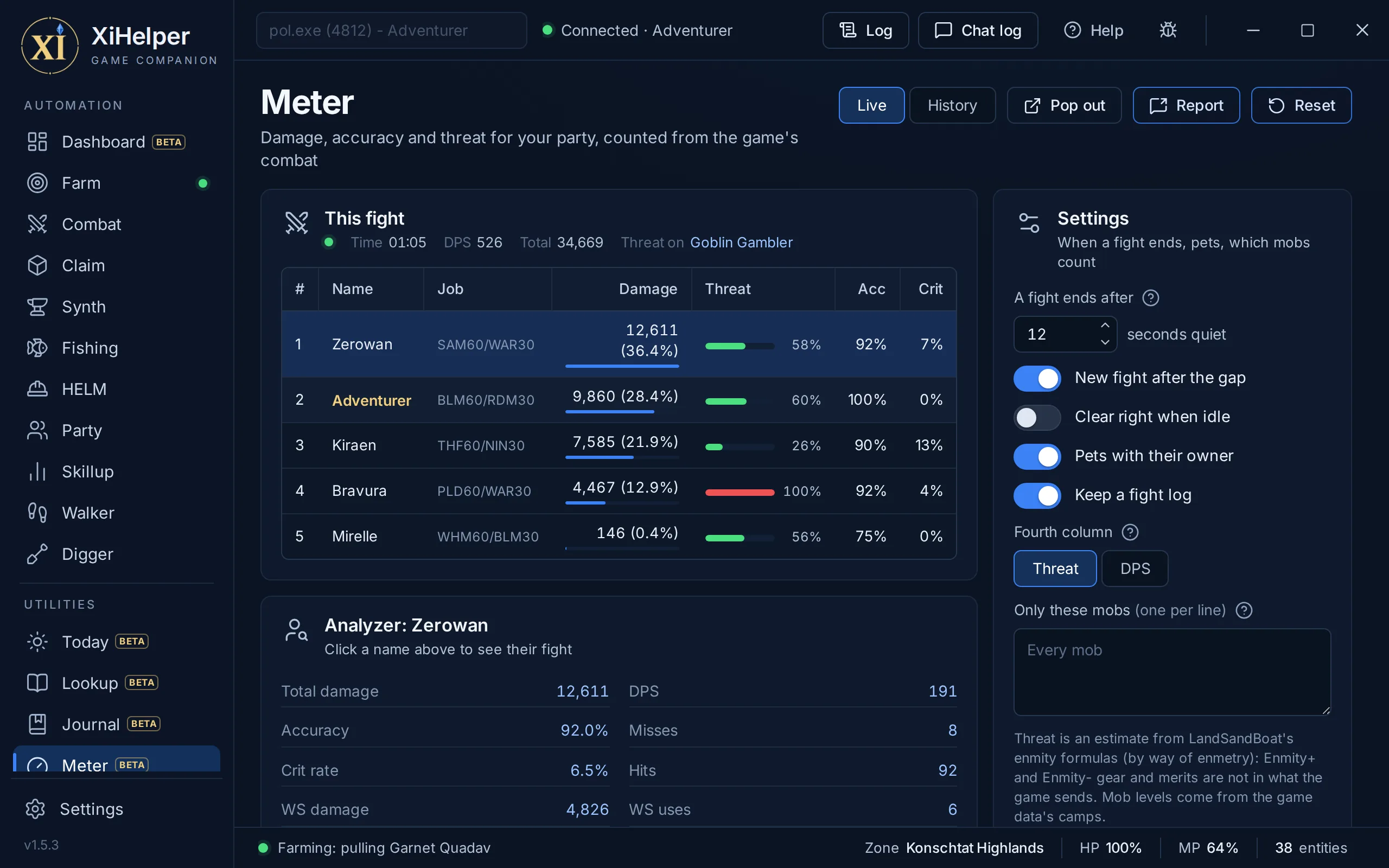
The Meter tab in XiHelper
This fightTime, damage per second and total, then everyone by damage, with their job, share, accuracy and critical hit rate.
ThreatEach player's estimated enmity on the mob as a share of the top: red for whoever has it, orange when someone is close to pulling it.
AnalyzerClick a name for their fight in full: melee, ranged, weapon skills, magic and skillchains, each weapon skill and magic burst with its uses, highest, lowest and average.
Pop out and reportA small window of its own, pinned above the game if you like. Report sends the top damage to party chat, a line at a time.
Recent fightsEach fight that ended this session, and a log of every fight if you want one.
HistoryEvery fight is kept on your PC the moment it ends, a session for each run of XiHelper. Pick a session, then a fight, to see its table and Analyzer again.
Utility

Radar

See everything around you, on the map

Radar shows the players and mobs around you on a compass radar or on the zone map, colour-coded so your target, party and claimed mobs stand out. Pop it out into its own window to sit beside the game.
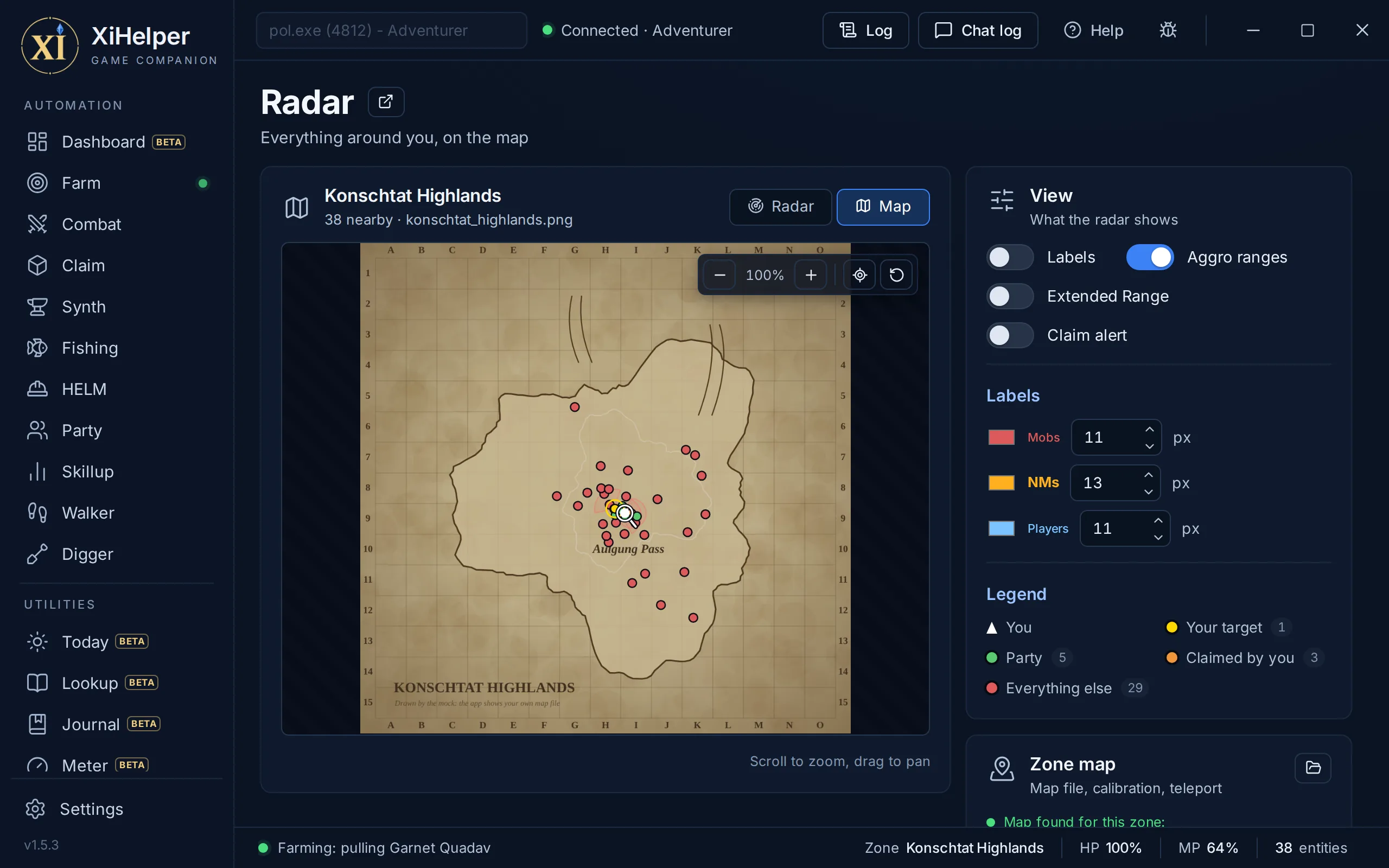
The Radar tab in XiHelper
Compass radarSet the range from 10 to 200 yalms, with range rings, north up or turned with your heading.
Zone map viewSee yourself and every blip on the zone's map: scroll to zoom, drag to pan, follow yourself or reset the view. Zone maps come in the maps download.
Colour-coded blipsGold for your target, green for your party, orange for mobs claimed by you and red for everything else. The legend counts each.
Name labelsShow each name beside its dot.
Maps that line upMost zones calibrate on their own from the game's map data. If the dots sit in the wrong place, click two points to calibrate by hand, and clear it any time.
Extended RangeAdds a Wide Scan sweep so mobs past the normal draw distance show as dim purple dots. It needs the plugin, asks the server for a fresh scan every couple of seconds, and on servers that keep Wide Scan to Ranger and Beastmaster you must be or sub RNG or BST.
Add your own mapsThe Zone map card says whether your zone has a map and which file to add, and opens the maps folder for you.
Pop-out windowOpen the radar in its own window, then size it and place it beside the game.
Click to teleportHigh risk, and off every session: when you turn it on, a click on a calibrated map warps you there at your current height, within the Warp page's exclusions. Teleporting is the clearest bot tell there is.
NMs and placeholdersThe NMs on the Claim page's list are marked, and their set placeholder spawns named (PH), across the zone with Extended Range on.
Terrain viewWhere the game's map does not line up, the map view draws the zone's terrain instead, so you and every mob sit exactly where you are.
Claim alertThe mob the Claim bot is going for glows, with a chime each time it picks one.
Your colours for namesSet the colour and size of each sort of name: mobs, NMs and players.
Utility

Bags

Every bag, and every character's

Bags shows your inventory across every bag your character has and moves items between them, right from the app. It also finds an item on any of your characters, says what your items fetch from an NPC and keeps every drop. Your bags come from the mythirdparty plugin, so the page fills once it is loaded.
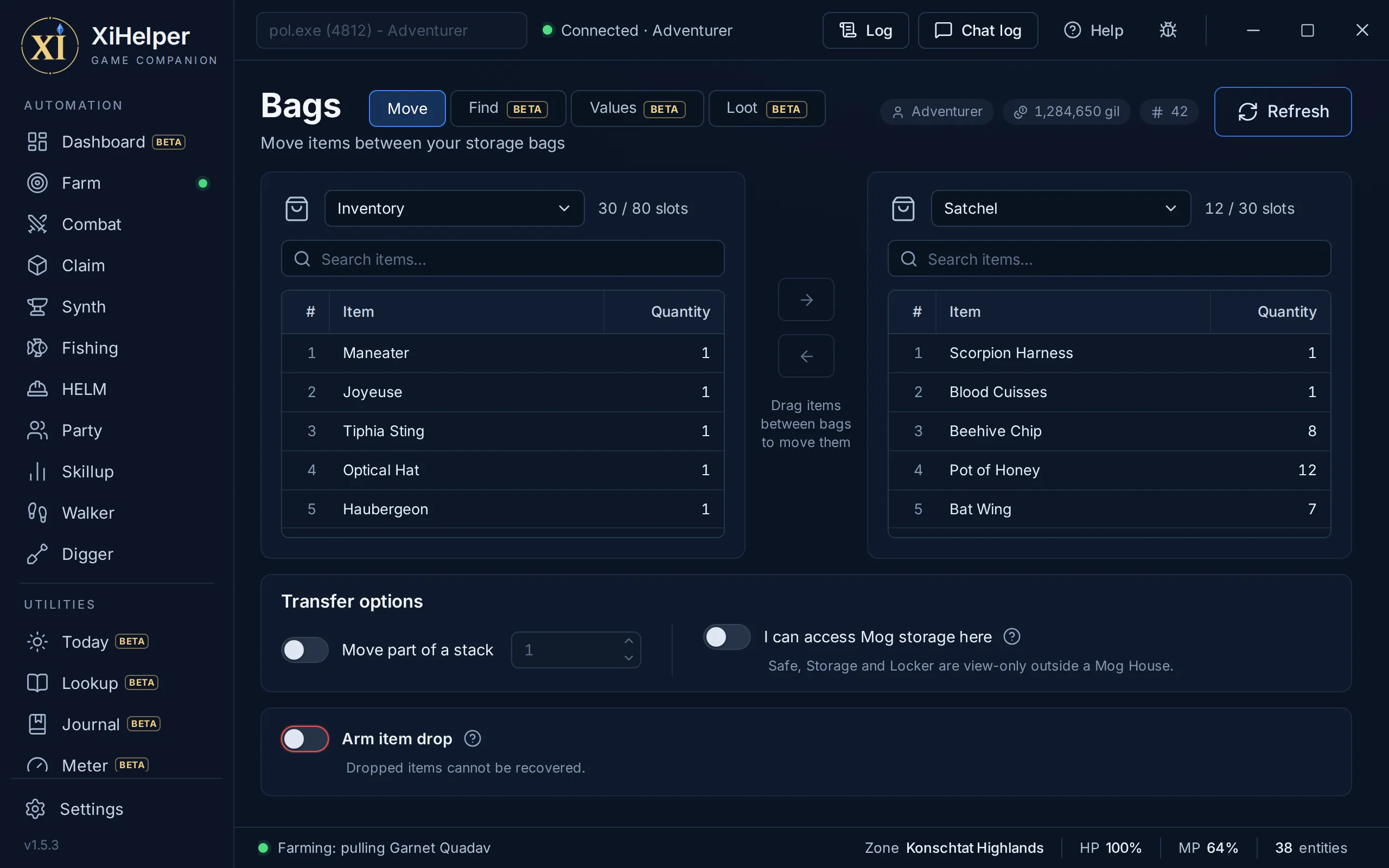
The Bags tab in XiHelper
Drag and dropPick a bag in each of the two panes and drag items across, or click an item and use the arrow buttons.
Every bag you haveInventory, Satchel, Sack, Case, Wardrobes 1 to 8, Mog Safe and Safe 2, Storage and Locker, each showing how full it is. Only bags your character has unlocked are listed, and Temporary items are shown but cannot be moved, as in the game.
Part of a stackMove the whole stack, or only as many as you type.
Search each paneFilter a pane by item name, and Refresh asks for a fresh snapshot.
Mog House rulesSafe, Storage and Locker are view-only outside your Mog House. At a nomad moogle, turn on I can access Mog storage here, which lasts until XiHelper closes.
Checked before it movesThe plugin checks the item is where the request says before it sends the move, and holds it back if not.
Armed item dropDropping needs Arm item drop first and disarms after each drop. A dropped item cannot be recovered.
Character and gilThe page header shows which character the snapshot is for and the gil on hand.
Find, on any characterType part of a name to see every stack of it in every bag, on this character and the others you play. Your characters lists each one's gil.
ValuesEvery item you carry or store, with what an NPC pays and tags that say why you might keep it: Gear, Usable, Rare, Ex, Crafting, Quest, NM pop. Split stacks shows the slots gathering would free.
Loot logEach drop this session, where it came from and who got it, with gil an hour by zone. Search every drop ever logged to find where you got something.
Utility

Gear

Gear sets, upgrades and best in slot

Gear builds named equipment sets from the items you own and wears them on demand, or has Combat and Synth swap to them for you. It also says what you own that beats what you wear, the best a job can wear at a level, and every job's level.
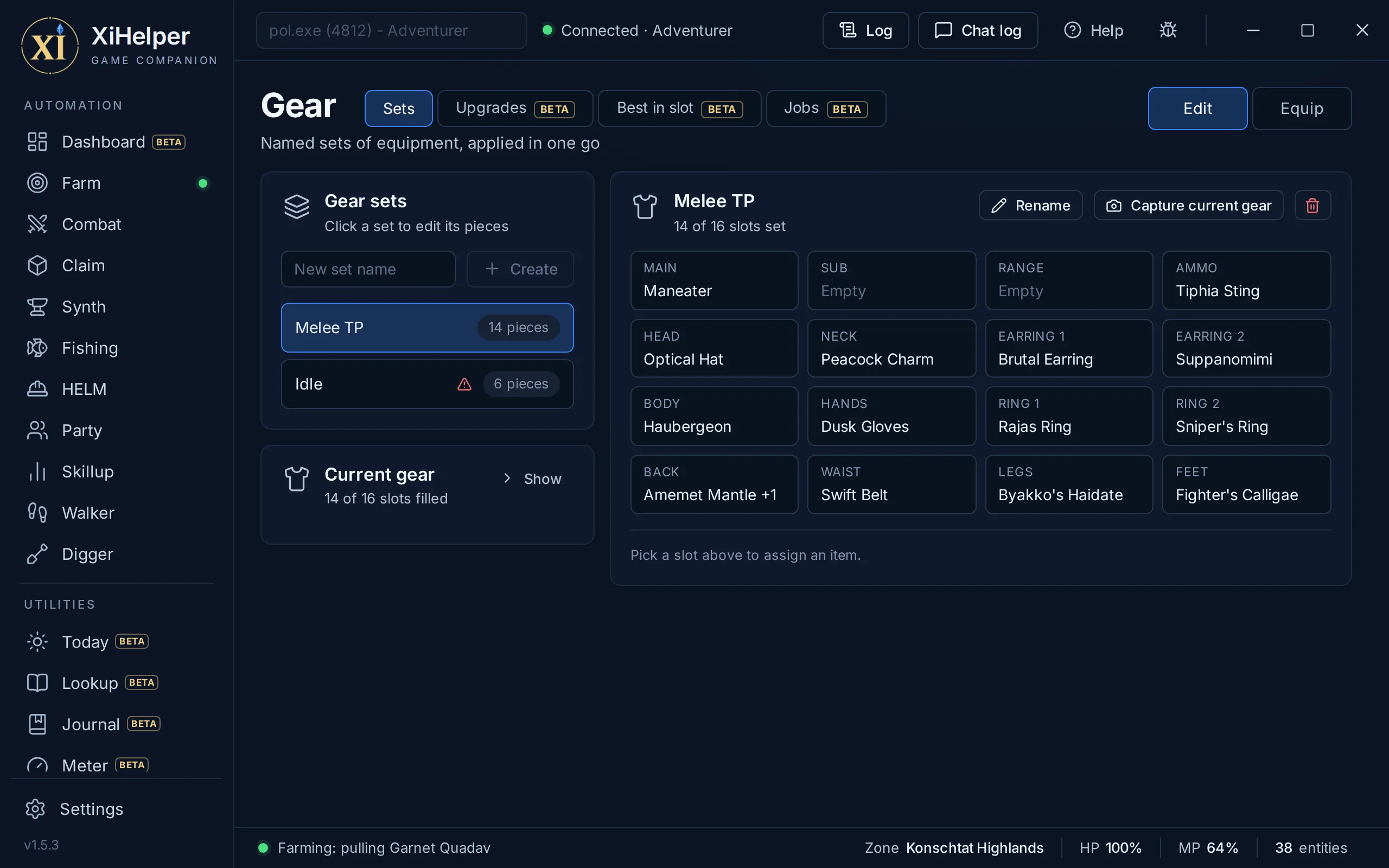
The Gear tab in XiHelper
All 16 slotsClick a slot and pick from the items you own that fit it.
Capture what you wearFill a set from whatever you have equipped right now.
Equip in one clickSwitch to Equip mode and click a set to wear it straight away.
Used by Combat and SynthSwap to a set for one combat action and back again, or wear one when a Synth run starts. Each set shows what uses it, and renaming a set updates them.
Flags pieces out of reachSets are equipped by name with /equip, so only from your Inventory or a wardrobe. The page flags any piece that is somewhere else.
Current gearSee what you have on right now, under the set list.
Kept per characterYour sets are saved with each character's settings, per server.
Upgrades you ownEvery piece in your bags that your job can wear now and that beats what you wear, with what it changes. Equip one, or all at once, and a band can tell you when a level up brings new ones.
Best in slotThe best a job can wear at a level, slot by slot, each piece with where it is (worn, a bag, another character) or where it comes from.
Weighed by jobPieces are weighed by what each job wants, from the server data's exact stats. Effects that only count sometimes are left out, so treat the lists as a strong suggestion.
JobsEvery job's level, the job and support job you are on, and what each gets next.
Utility

Market

Auction House prices, and a watch list

Comes with paid time, not the free trial. Real Auction House sales for HorizonXI, PhoenixXI and EdenXI, from PSXI, what each of your items fetches, and a watch list that tells your phone when an item you want comes up.
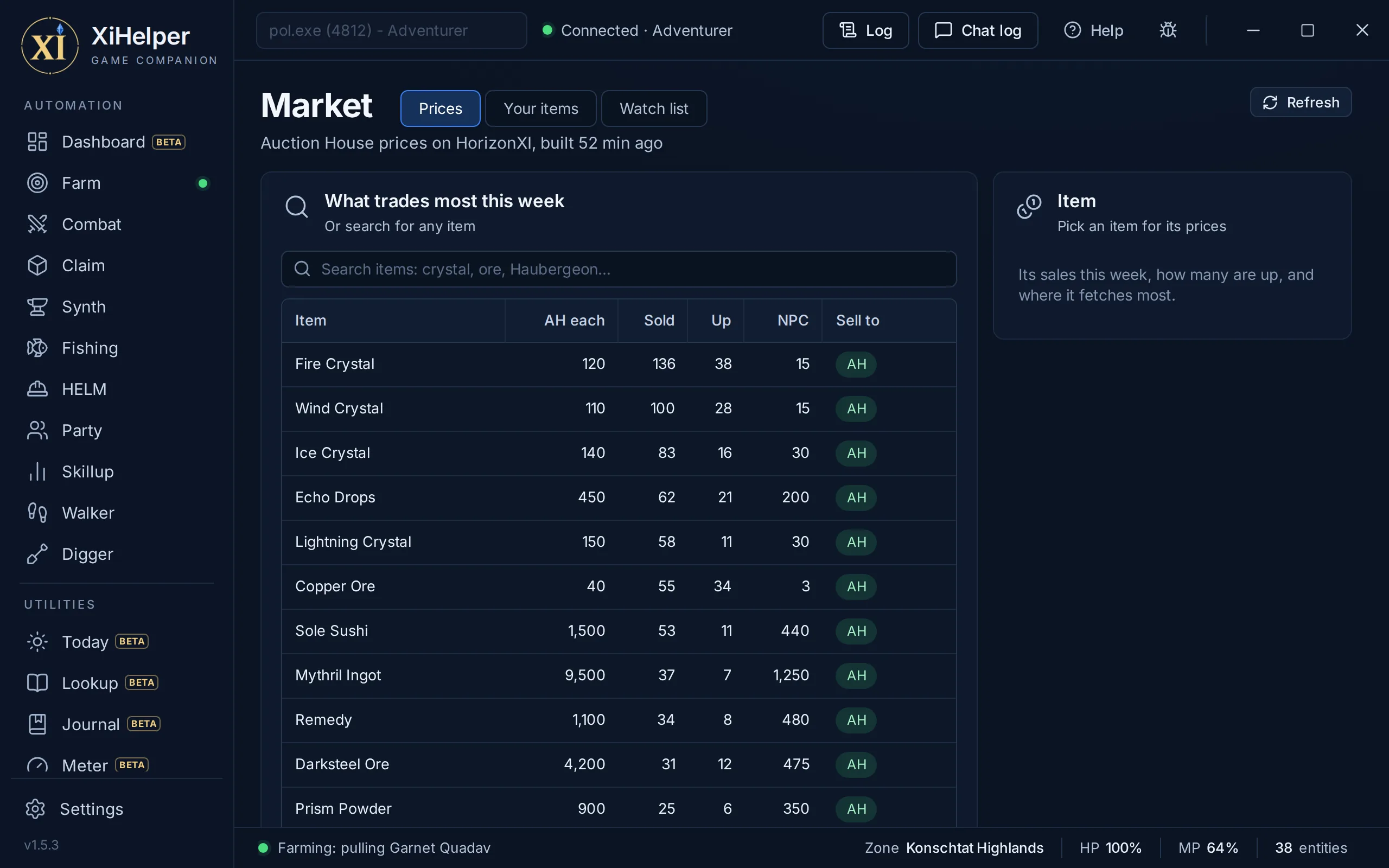
The Market tab in XiHelper
Prices for any itemMedian, range, sales this week, how many are up now and what an NPC pays, for singles and stacks, with the bazaar asking price. Collected from PSXI every two hours.
Your itemsEverything you carry, with where each fetches most after the listing fee, and the total sold that way.
Watch listWatch an item, or a full stack, and set your bid. When it comes up, your phone hears through the Chat relay, with a Buy button that shows exactly the bid it pays.
Buys only at the counterXiHelper bids only while your character stands at an Auction House counter, after checking your gil, a free bag slot and that a Rare item is not one you hold. The Auction House charges your bid, not the seller's price.
Prices everywhereThe same prices show on Bags, Gear's best in slot and Today.
Signed, never your keyThe app signs in with a short-lived pass, never your licence key, and checks each price snapshot's signature before it shows it.
Buy severalBuy a watched item more than once, one at a time with a random pause between, stopping at the first that does not go through.
Utility

Assistant

Ask about the game, on your own key

Comes with paid time, not the free trial. Ask in plain words and the Assistant looks things up in the game data, the Market's prices and, if you let it, your character, rather than guess. It runs on your own key with Anthropic (Claude), Google (Gemini) or OpenAI, so that service bills you for what you use.
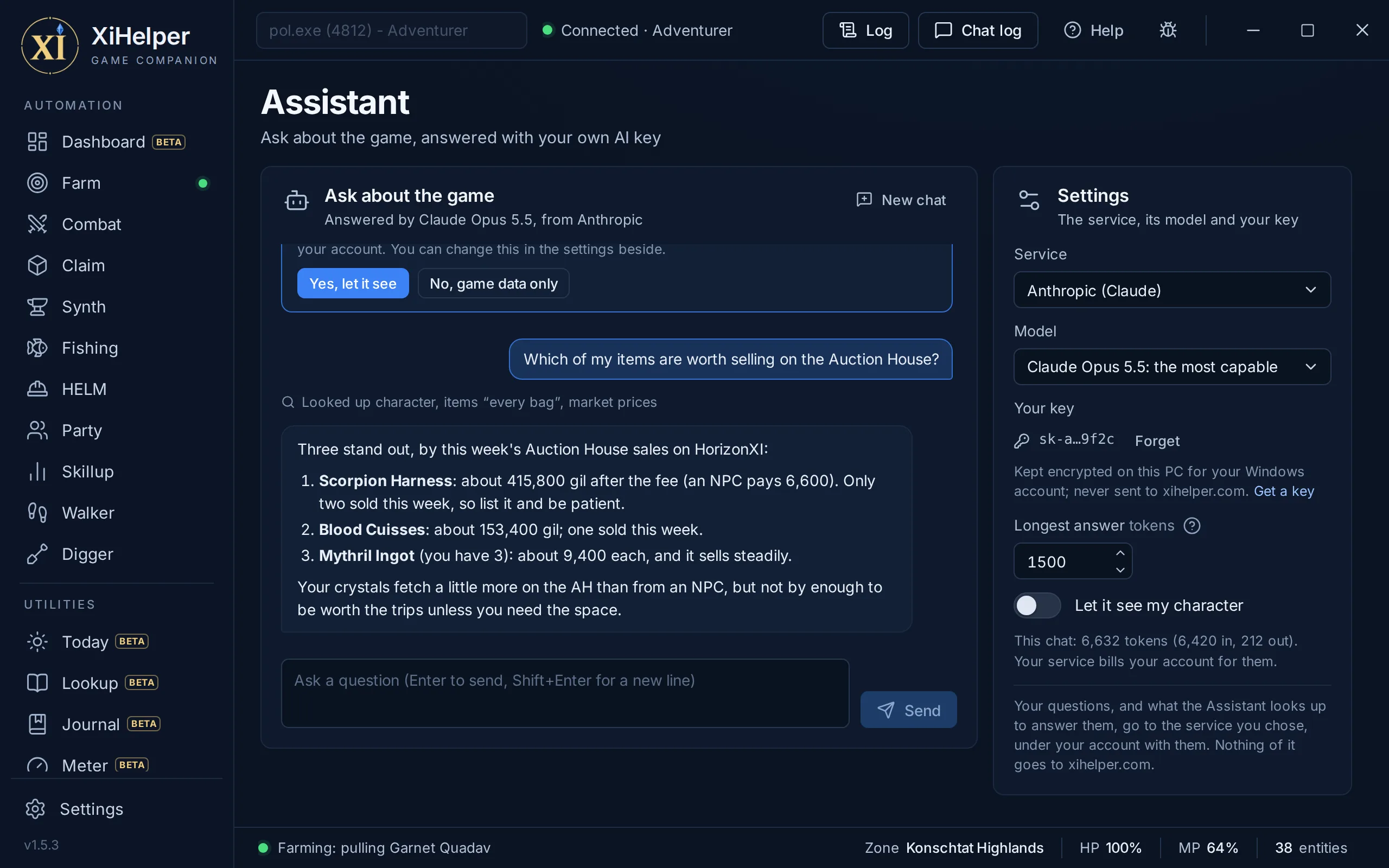
The Assistant tab in XiHelper
Looks things upWhere an item comes from, what to fight at your level, how a quest goes, what to craft. Each lookup shows as a line in the chat.
Your character, if you say soIt asks first. With your say-so it sees your jobs and levels, where you are, your bags (and your other characters'), the quests you track and your gear.
Your key stays on your PCKept encrypted for your Windows account, never in your settings, and never sent to xihelper.com. Your questions go only to the service you chose.
Pick the modelClaude Opus, Sonnet or Haiku; Gemini Pro, Flash or Flash-Lite, which Google's free keys can use; or any service on your PC that speaks OpenAI's API.
Long chats cost lessA chat keeps its last 12 questions, older lookups are cut short, and Claude reuses what it has already read.
Utility

Chat

Read and send chat from the app

Chat shows every line the bot's reader sees, stamped with the time it arrived, and lets you send chat or any slash command from the app. It is also the quickest way to see exactly what the bots are reading.
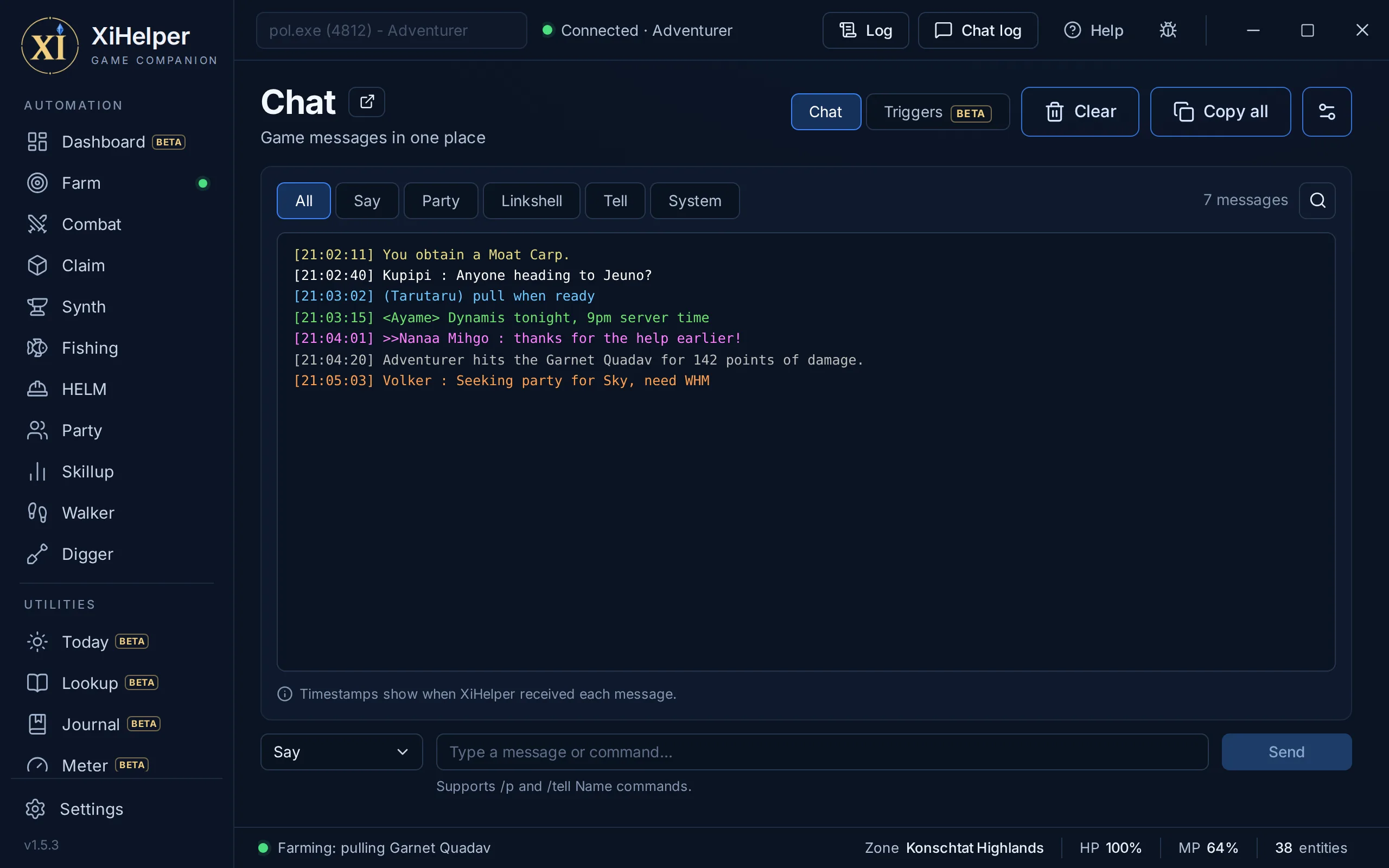
The Chat tab in XiHelper
Live chat with timestampsEvery line the reader sees, stamped with the time XiHelper received it.
Filters and searchShow All, Say, Party, Linkshell, Tell or System, and search as you type. Clear empties the view and Copy all copies it.
Send on any channelSay, Shout, Yell, Party, Linkshell, Linkshell 2 or Tell: pick a channel, type and press Enter.
Channel shortcutsStart a line with /p, /l2 or /tell Name to switch for that send. Any other slash command is sent exactly as typed, so the box doubles as a command line.
Your own coloursColour chat by channel, choose a colour for each, or reset to the classic FFXI palette.
Only new linesOld chat that resurfaces in the game's memory is held back, so you only see what is new.
Its own windowChat log in the top bar, or the pop-out button, opens the same view in its own window.
TriggersGame commands a chat line sets off, with or without a bot running: a tell, party, linkshell, say or a game message, matched by words or an expression. Game actions only, so a trigger can never answer a player for you.
Utility

Warp

High-risk position tools, off by default

Warp edits your position and status in the game's memory, for experienced users only. It is high risk: these edits fail server-side checks, and misuse will get you banned. Nothing on the page does anything until you turn on Enable Warp, and it is off every time XiHelper starts.
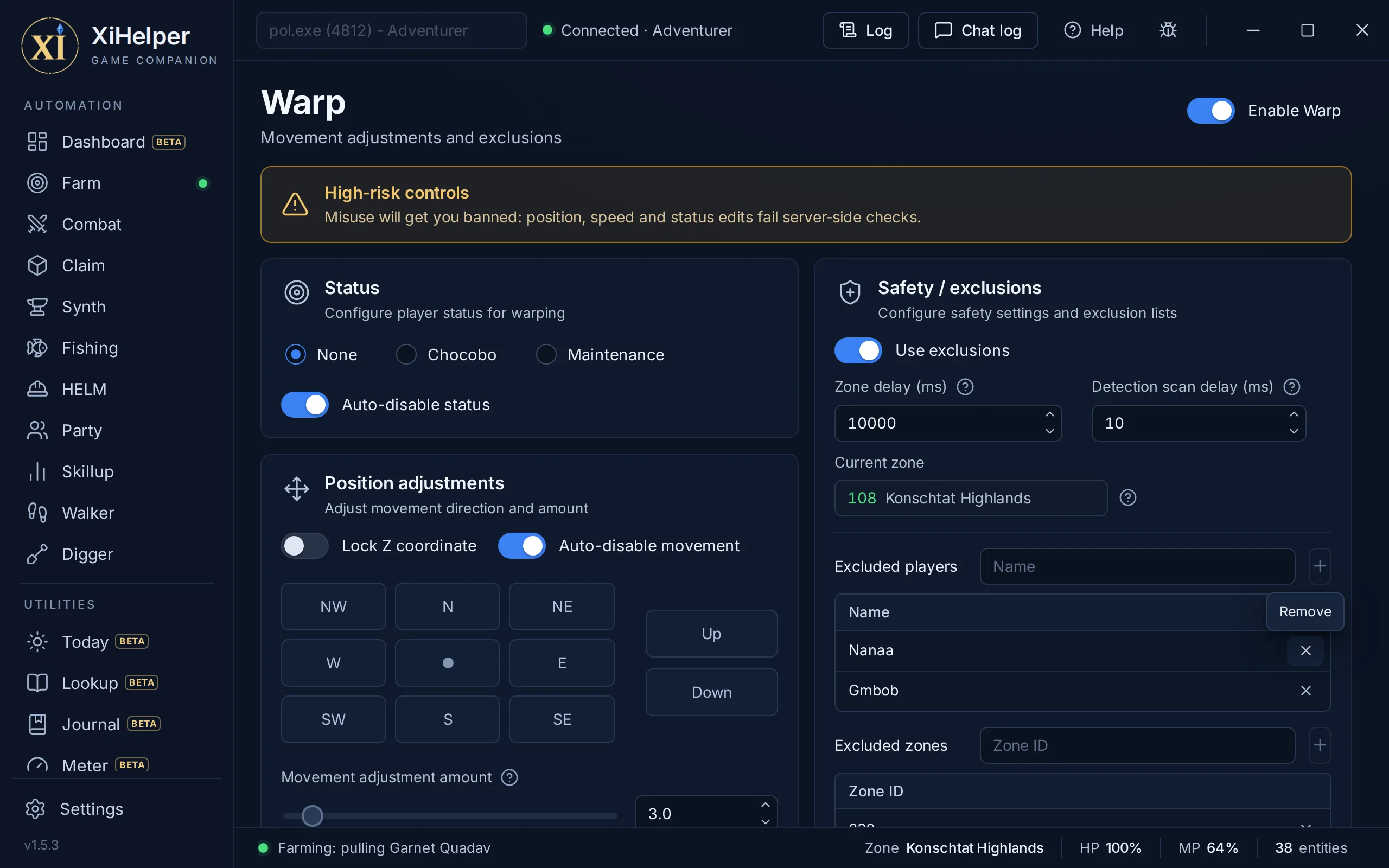
The Warp tab in XiHelper
Enable Warp switchEvery edit on the page stays inactive until you turn it on. It is never saved, so Warp always starts off.
Nudge in eight directionsHigh risk: move a set amount in any of eight directions, or up and down, one press at a time.
Lock your heightHigh risk: hold your height where it is, with an option to switch it off on every zone change.
Status poseHigh risk: set a Chocobo or Maintenance pose, with an option to put it back on every zone change.
Player and zone exclusionsForce every edit off while an excluded player is near or you are in an excluded zone. Add names and zone ids with a click; the page shows your current zone's id.
Zone delayHold every edit off for a while after each zone change, and set how often it re-checks for excluded players.
Shared by every teleportClaim's teleport and the Radar's Click to teleport obey the same exclusions and zone delay, and both are high risk too.
Safety

Anti-Ban

Stops every bot at the first warning

Anti-Ban watches for signs that a GM or another player is paying attention to you, and stops every bot the moment it sees one. It runs beside whichever bot you use, whichever page you are on, and can send what reaches you to your phone. It helps you react in time; it cannot make automation safe.
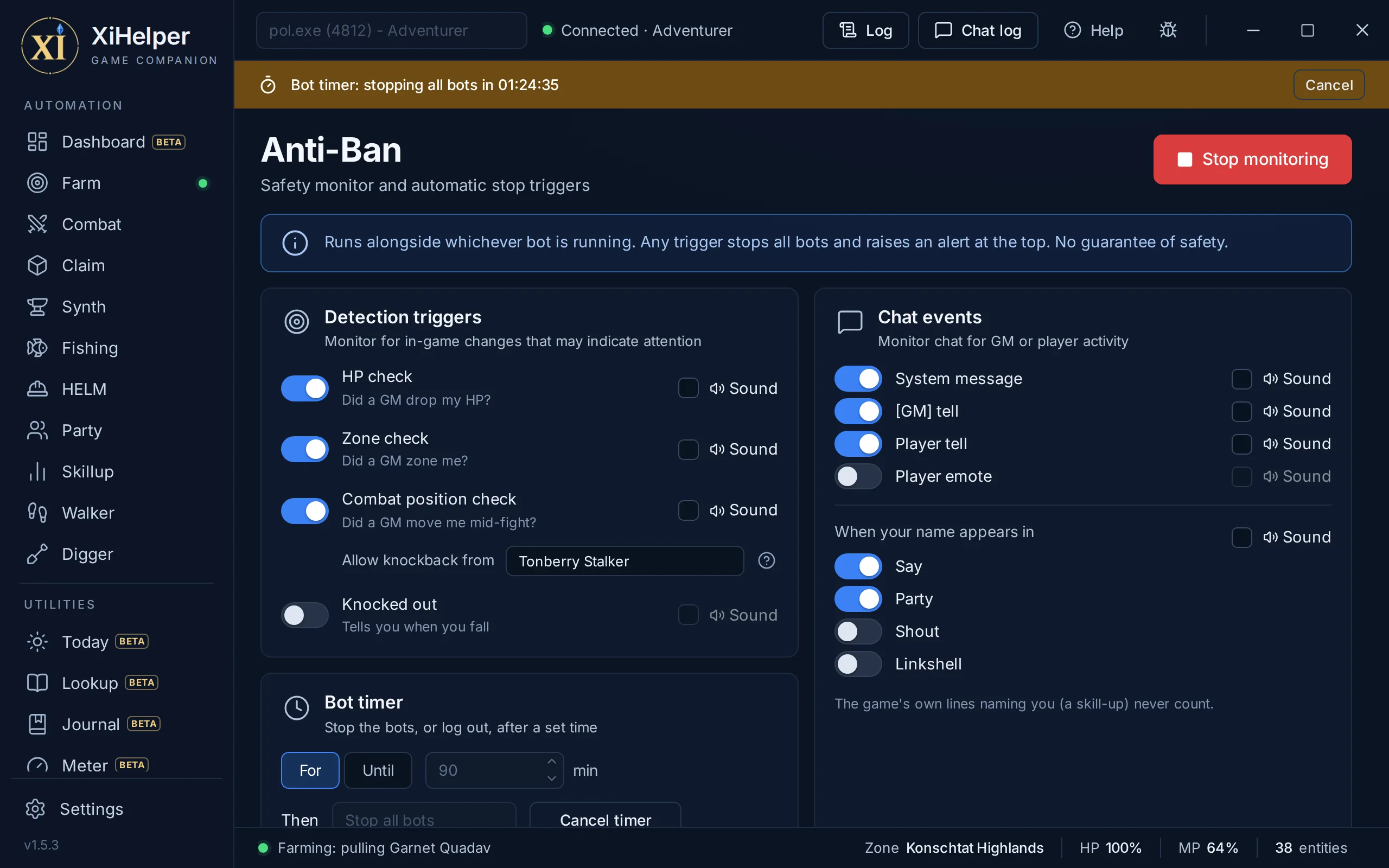
The Anti-Ban tab in XiHelper
HP checkAlerts if your HP falls from half or more to 15% or less in an instant, the way it would if a GM dropped it.
Zone checkAlerts if you change zone while it is watching, the way you would if a GM moved you.
Combat position checkAnchors your spot early in each fight and alerts if you are moved 2 yalms or more before it ends. Name a mob whose moves really do knock you back, and it re-anchors instead.
GM tells and system messagesAlerts on a [GM] tell or a system message.
Player tells and emotesAlerts on a tell from a player, or an emote aimed at you, such as a wave, bow or point. Your own emotes and combat lines never count.
Your name in chatAlerts when your name appears as a whole word in Say, Party, Shout or Linkshell. The game's own lines about you, such as a skill-up, never count.
Stops everything, tells you whyAny trigger stops every bot and raises a red band across the top of the app that stays until you dismiss it.
Bot timerRun it for a number of minutes or until a time of day, then stop every bot, log you out or close the game. Logging out or closing waits for the fight to end. Only Start timer arms it, and it runs even with the monitor off.
Human timing built inFishing uses separate random delays and can keep to your Earth hours, so a session does not look like one that never sleeps. Synth waits the pause you set between crafts.
Risky tools start offWarp and the Radar's Click to teleport are off every time XiHelper starts, so a saved setting can never bring them up switched on.
Chat relay to your phoneTells, GM lines, emotes aimed at you, your name in party or linkshell and an Anti-Ban stop go to your phone through your own Telegram bot. Reply there to answer in the game; /status and /stop work too.
Reply draftsWith paid time, your AI service, on your own key, drafts three short replies under each message, and a tap sends one. Nothing is sent until you tap.
Remote controlTurn it on and /start a bot or /walk to a place from your phone, each once you tap to confirm, or ask for your gil and the watch list. /walk lists your places and zone lines, nearest first. With paid time, /remote takes your own words.
Locked to your chatThe bot talks only to your own private chat, linked once you confirm it on the PC. The token stays encrypted on your PC and goes only to Telegram. Settings, Warp, your items and keys are never reachable from the phone, and the only thing it can buy is a watch list item at your bid.
Knocked outAn alarm when your character falls, and a message to your phone through the Chat relay. It stops nothing: the bots follow their Death options.
The app

Settings

Connection, plugin, licence and profile

Settings holds everything that is not one bot's: your server and game process, where the keyboard plugin goes, your licence, your profile and updates. Changing it never stops a running bot.
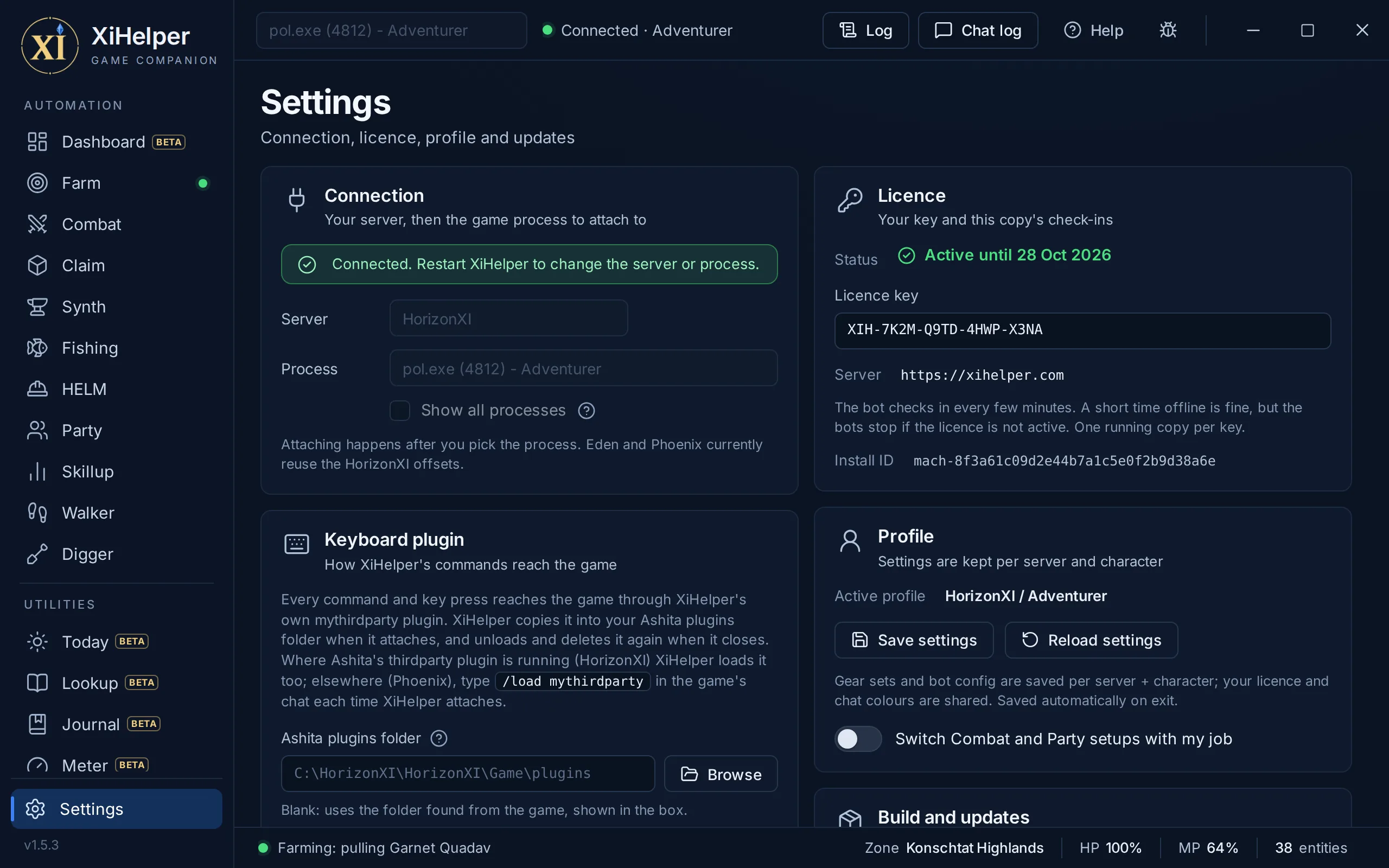
The Settings tab in XiHelper
Server and game processPick HorizonXI, Eden, Phoenix or CatseyeXI, then the running game from a list filtered to likely FFXI clients (or tick Show all processes). Both lock once XiHelper has attached.
Keyboard plugin folderXiHelper finds Ashita's plugins folder from the running game, or Browse for it yourself. A status line says whether the plugin is in place, and a button copies /load mythirdparty.
Your licence keyPaste your key, see its status and days left, and find the Install ID to quote if you contact support.
Profile per characterSettings are kept per server and character and save on exit. Save settings saves now and Reload settings throws away unsaved changes.
Build and updatesSee your version, the settings file and an update's progress, with Install now & restart when one is ready.
Log out characterSends the game's own /logout, the usual 30 second countdown that an action or damage cancels.
Session log controlsTurn session log sending on or off, open the folder with your last 10 sessions' logs, and see this session's id for support.
Quit properlyQuit saves your settings, takes the plugin back out of Ashita and frees your licence seat before it closes.
Setups that follow your jobSwitch Combat and Party setups with my job keeps a setup for each main job and loads it when you change job.
An overlay in the gameA few lines on the game screen, dragged where you like: what the bots are doing, your target's level and whether it aggroes and links, EXP and LP an hour, damage a second and your next Journal step.
/xih commandsType /xih start with a bot's name, /xih stop or /xih toggle in the game's chat. Each does what the window's Start and Stop do, with the same checks.
The app

App and setup

One window that runs beside your game

XiHelper is a Windows app that sits beside your HorizonXI, Eden, Phoenix or CatseyeXI client in its own window. It reads the game directly and acts through its own Ashita plugin, mythirdparty, which it copies into the game's plugins folder each time it attaches.

The App and setup tab in XiHelper
The mythirdparty pluginEvery command and key press XiHelper sends reaches the game through its own Ashita plugin, which also reports your bags, gear and gil. XiHelper copies it in when it attaches and removes it again when it closes.
Loading the pluginOn HorizonXI, XiHelper loads it for you. On Phoenix, type /load mythirdparty in the game's chat each time XiHelper attaches; a button copies the command for you. CatseyeXI runs an older Ashita, so XiHelper brings a build of the plugin made for it and picks it for you.
A band when it is missingIf the plugin is not up a few seconds after attaching, an amber band says so, with a button to copy the load command. A bot started without it waits 30 seconds, then stops and says why.
Updates itselfIt checks for a new version when it starts and downloads it in the background, with a progress band. The update installs the next time XiHelper starts, or straight away with Install now & restart while no bot is running.
One running copy per keyXiHelper checks your licence every few minutes, and a short time offline is fine. Starting it on another PC takes the seat and locks the older copy out.
Settings per characterBot setups and gear sets are kept per server and character, while your licence key and chat colours are shared.
Setups you can shareFarm, Combat and Fishing save to .xifarm, .xicombat and .xifish files, and HELM routes to .xiroute. Each page's Load lists only its own type, and older .json setups still load.
Pop-out windowsRadar, the Meter, Chat, the Log and Help each open in their own window, to size and place beside the game.
The LogLog in the top bar shows what the bots are doing and why, line by line.
Always know what is runningThe sidebar marks every running bot with a green dot, and the status bar shows what the bot is doing, your zone, HP and MP. Farm and Combat run together; starting any other bot takes over.
Bands you cannot missBands across the top show the bot timer's countdown, an update, an Anti-Ban stop or why a bot stopped.
Bug report buttonSends your message with this session's log (chat taken out), your settings and your status. Tick a box to add the last 15 minutes of chat when the problem is about something said.
Session logs, privateEach session's Log is sent to help fix problems, with chat text taken out, encrypted on your PC and kept 90 days. Turn it off in Settings and it stays on your PC.
Built-in Help guidePress F1 or Help for a guide to every page, opened at the page you are on, with its own pop-out window.
Five languagesThe window and its Help guide come in English, Japanese, Chinese, Russian and Arabic, right to left for Arabic.
CatseyeXI, in betaPick CatseyeXI under Settings, or let it fill in when you attach through its loader: XiHelper brings a plugin build for its older Ashita. Its own custom content may not be handled by the bots.
Notices a closed gameWhen the game closes while XiHelper is attached, the bots stop, it shows Disconnected, and you pick the game again once it runs, without restarting XiHelper.

Nothing matches that. Try another word, or ask us.

Ready when you are

Windows only. Pay with crypto or PayPal, paste your key, and pick a tab.